Android Auto is preparing a new dashboard media player that puts more controls within reach. The screenshots reported on July 14 show a smaller album-art area, track information moved below it, and room for actions that the current card often hides: shuffle, repeat and, where an app supports it, a like button.
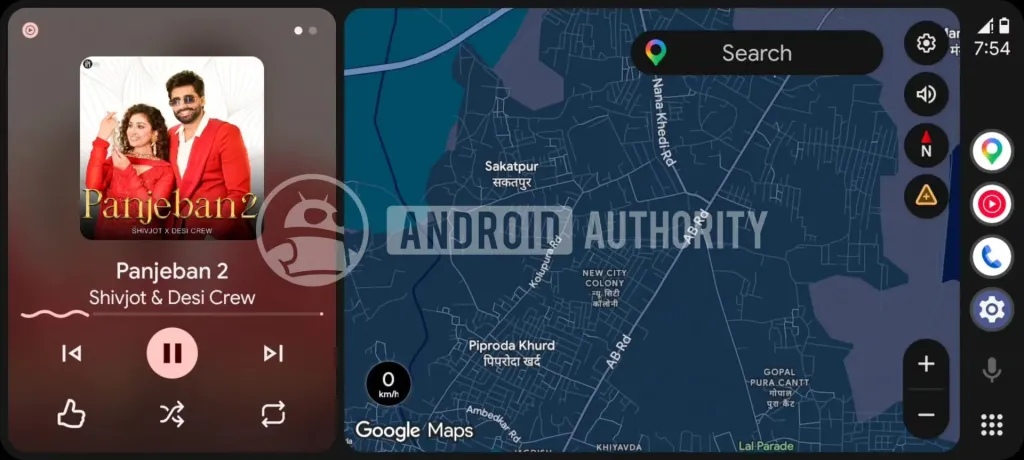
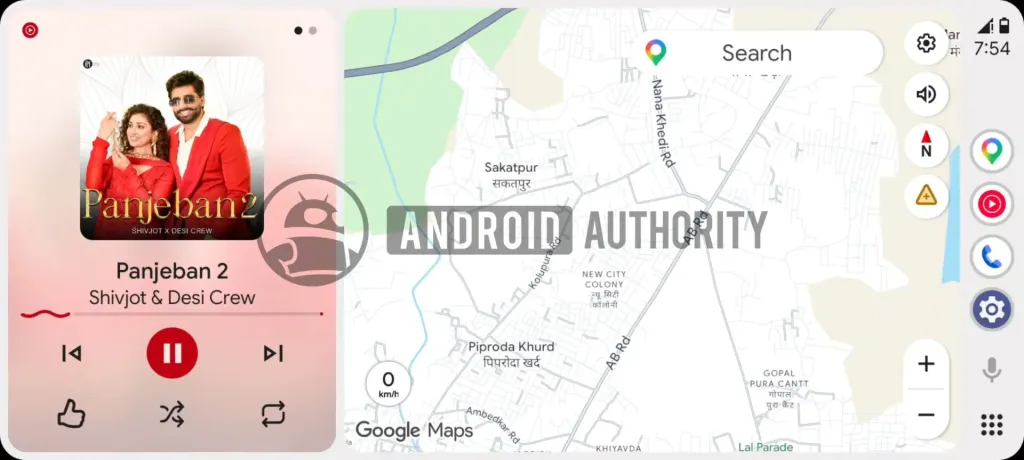
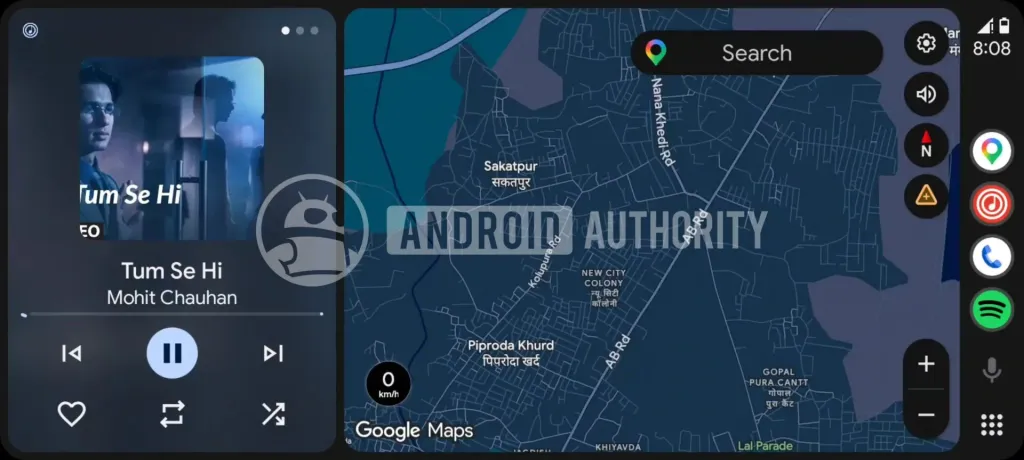
This is not a finished public feature. The layout was enabled in development builds, so there is no announced rollout date, no supported setting to switch on, and no promise that every music or podcast app will expose the same controls. That distinction matters: a screenshot from an APK teardown is useful evidence of direction, not an update you should start troubleshooting for tonight.
What is changing in the dashboard card
In the standard Android Auto driving view, Maps takes the largest part of the display while the media card sits alongside it. Today, the card makes album art the visual centrepiece and keeps the core play/pause and skip controls compact. The reported redesign changes that hierarchy. Album art becomes smaller, the song and artist move into a clearer central stack, and a second row can host extra controls supplied by the active media app.
That is a modest visual change with a sensible practical aim. Reaching shuffle or repeat should not require opening a full-screen player just to change one playback mode. The potential benefit is strongest for people who use Android Auto in split-screen dashboard mode, where a full-screen music app means giving up more map context than they want.
What changes in practice
The useful part is not “more buttons” in isolation. It is less navigation through layers while driving. A better dashboard card can keep a route visible while making ordinary audio controls easier to identify at a glance. But Google still has to get the trade-off right: a compact card with too many tiny icons is not an upgrade if drivers need to read it like a flight deck.
There is another limit worth keeping in view. Android Auto media controls depend on the app that provides them. A music service may offer shuffle, repeat and a favourite action; a podcast or audiobook app may expose something different, or nothing beyond transport controls. Do not assume that a screenshot using YouTube Music guarantees identical buttons in Spotify, Pocket Casts, Audible, or a manufacturer’s music player. If your existing dashboard is unstable rather than merely limited, start with our Android Auto crash checks for USB, wireless and app bugs; a new interface will not repair a connection fault.
What to check when it eventually arrives
- Keep Android Auto current through its official Play Store page. A staged server-side rollout can arrive after the app update, so an updated version is necessary but not proof that the layout is available.
- Test it parked. Check which controls your preferred media app actually provides before relying on a new placement during a drive.
- Try both dashboard and full-screen views. The reports describe the compact dashboard card, not a wholesale replacement for every player screen.
- Do not clear data or reinstall the app for an unannounced UI. Those rituals do not manufacture a staged rollout and can cost you paired-car settings and time.
- Keep accessibility in the decision. If the eventual design makes labels or controls harder to recognise, send feedback through Android Auto rather than treating a change in a car interface as inevitable progress.
The broader direction is sound: Android Auto needs to make routine actions quicker without turning the dashboard into a crowded phone screen. Until Google ships it, the responsible expectation is simply this: a promising interface test, not a feature to chase. Watch for an official changelog, test the app-specific behaviour when it reaches your car, and judge it by whether it reduces distraction rather than by the number of icons it adds.
In brief
- Android Auto is testing a redesigned dashboard media player with space for more controls.
- The reported buttons can include shuffle, repeat and app-specific actions such as likes.
- The screenshots come from development work; Google has not announced a release date.
- When it arrives, test it parked and expect each media app to expose different controls.