Google has updated Android Bench, its benchmark for measuring how well LLMs handle real Android development tasks. The interesting part is not just the eight new models added to the leaderboard: Google has also changed the methodology by adopting the Harbor framework and opening more of the benchmark to community contributions.
For Android developers, or anyone using AI agents inside Android Studio and similar tools, this is a screwdriver-in-hand kind of update. A raw leaderboard is useful, but used badly it turns into marketing with numbers. Android Bench is trying to measure scenarios closer to day-to-day work: Jetpack Compose migrations, wearable networking, platform API updates and other cases where a model has to understand code, project context and Android-specific constraints.

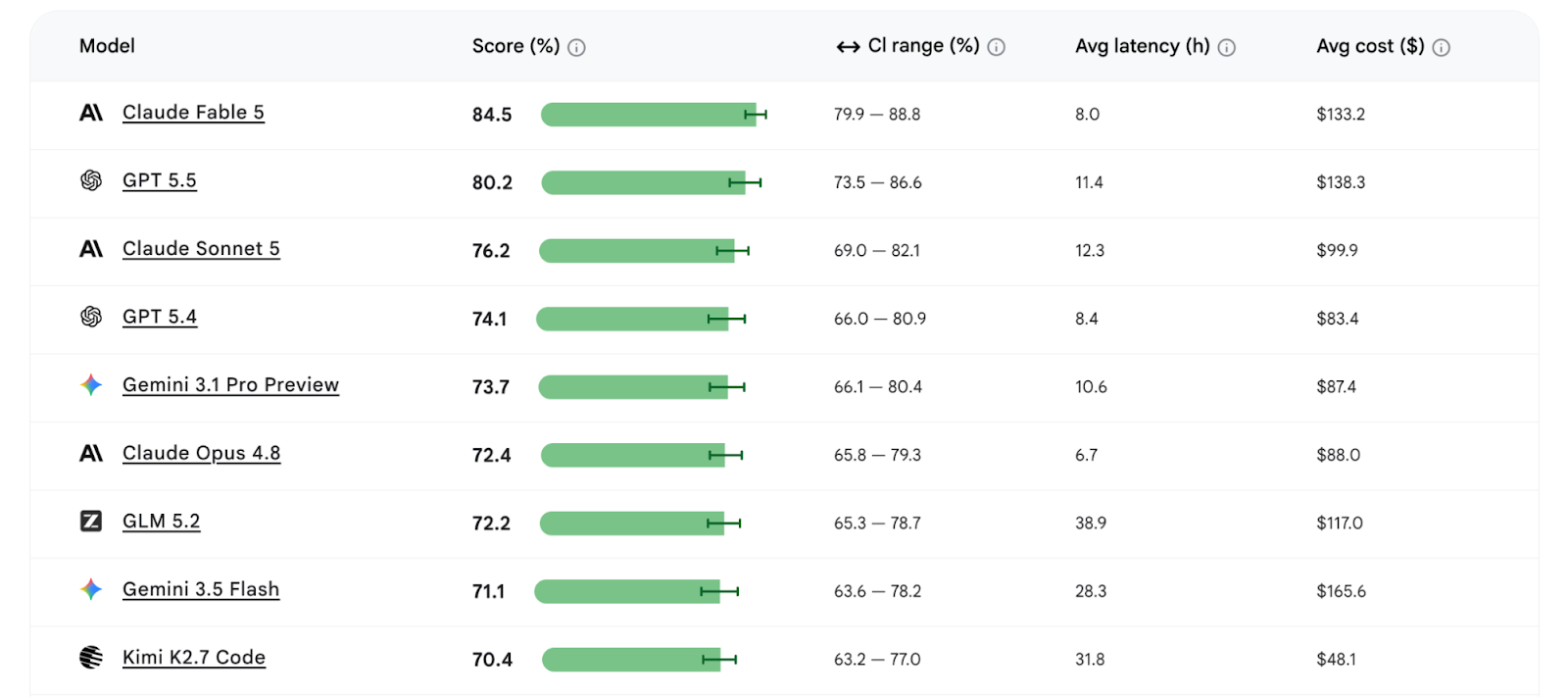
Google says the July release adds Claude Fable 5, Claude Sonnet 5, Claude Opus 4.8, GLM 5.2, Kimi K2.7 Code, MiniMax M3, Qwen 3.7 Plus and Qwen 3.7 Max. Ars Technica’s useful observation is that Gemini does not lead the updated leaderboard: Claude Fable 5 ranks first with 84.5, followed by GPT 5.5 at 80.2 and Claude Sonnet 5 at 76.2. Google is publishing a benchmark where competitors appear ahead. In this market, that is healthier than the usual brochure fog.
What Actually Changes
The practical takeaway is not to pick “the best model” as if this were a GPU chart. Android Bench matters because it can show whether an agent survives Android-specific tasks and how expensive that work is. A very high-scoring but costly model may make sense for risky refactors; it may be a poor choice for repetitive work, assisted lint checks or boilerplate generation. For a small team, accuracy, cost, latency and transparency matter almost as much as the absolute score.
This is where the move to Harbor gets interesting. Google says the new framework should make it easier to run the benchmark, evaluate different setups and share results. If that holds up beyond the official page, Android Bench becomes less of a showcase and more of a verifiable tool. Lab translation: before putting an AI agent into your development workflow, test it on your own tasks instead of only reading this month’s ranking.
How To Read Android Bench Without Being Fooled
The first check is the task type. A model that fixes a build error well is not automatically good at migrating a Compose UI or changing Wear OS networking code. If your project depends on Bluetooth, background services, permissions or OEM compatibility, the general benchmark is only a starting point.
The second check is operating cost. Ars Technica notes that some top models can be expensive to run: that does not make them useless, but it does require a strategy. The top model can be reserved for high-risk work, while a cheaper model may be enough to explain stack traces, generate first-pass tests or suggest patches for review. AI-assisted development works when it has a budget and a control chain.
The third check is reproducibility. Google is now inviting developers to submit Android tasks and share evaluations. That is the part that could make Android Bench stronger: if real bugs, awkward edge cases and less demo-friendly scenarios enter the dataset, the leaderboard becomes harder to optimize superficially.
A Practical Mini-Runbook
- Pick 3-5 tasks from your own project: broken build, API migration, tests, UI bug, device compatibility.
- Record the input, expected output, time spent, estimated cost and number of human interventions needed.
- Validate every patch with builds, tests and manual review: the benchmark does not replace your pipeline.
- Separate exploratory tasks from production tasks: an agent that “seems to get it” can still break an edge case.
- Use Android Bench as a comparison tool, not an oracle. Oracles in software usually end up in post-mortems.
Related AndroidLab coverage: we have already covered Android CLI 1.0 and AI agents for Android Studio, which is the operational side of the same trend: bringing agentic tools into daily development without handing them the repository keys and hoping for divine intervention.
In Short
- Google has updated Android Bench with Harbor and eight new models.
- Claude Fable 5 ranks first in Google’s cited leaderboard, while Gemini does not lead.
- The benchmark focuses on concrete Android development tasks, not generic chatbot ability.
- Developers should weigh accuracy, cost, latency and human review together.
- The most promising change is community-submitted Android tasks and evaluations.