On this page
The interesting part is not merely that an Android PC-game emulator has gained another button. GameNative v1.1.1 prerelease brings Nexus Mods into the app, with file and collection import, installed-mod management, and separate profiles for each game. For people already running PC games on a phone, that can replace the usual trial-and-error of moving archives through folders and prefixes.
It is still a pre-release, not a universal compatibility pass. A mod must match the game, its version, and the way GameNative runs it. The sensible Lab rule is less glamorous but much kinder to save files: get the unmodded game working first, then change one variable at a time. For a different branch of PC gaming on Android, see our Starboard and PortMaster setup guide; the compatibility layers differ, but the careful workflow does not.
Requirements to check before the first download
The official release lists its standard build for Android 8–14. There is a separate Quest/VR APK for sideloading and legacy storage, which is not the right choice for an ordinary phone. For a normal Android device, use the APK published by the project on GitHub, rather than a random mirror: GameNative is not distributed through Google Play for this release.
- enough free space for the mod, temporary downloads, and a backup;
- GameNative updated to v1.1.1 prerelease and a game that already launches without modifications;
- a Nexus Mods account if you plan to download through the integration, plus any requirements shown on the individual mod page;
- a copy of the game saves and configuration before changing collections or mod files.
This is not paperwork for its own sake. PC mods can depend on a specific loader, an exact executable version, Windows libraries, or paths that do not line up with Android’s compatibility environment. If the base game is already unstable, adding a mod only creates a failure with more possible causes.
A cautious Nexus Mods workflow in GameNative
- Back up and test the unmodded game. Check that it launches, that audio and controls work, and that the save you want to protect loads correctly.
- Update GameNative from the project’s official APK. When Android asks for confirmation for the GitHub installation, make sure you selected the standard build, not the legacy XR package.
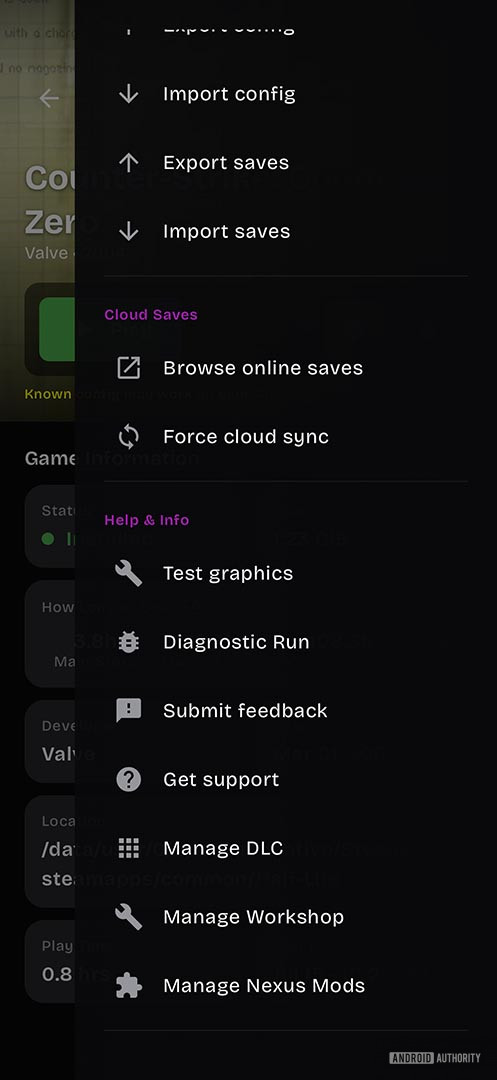
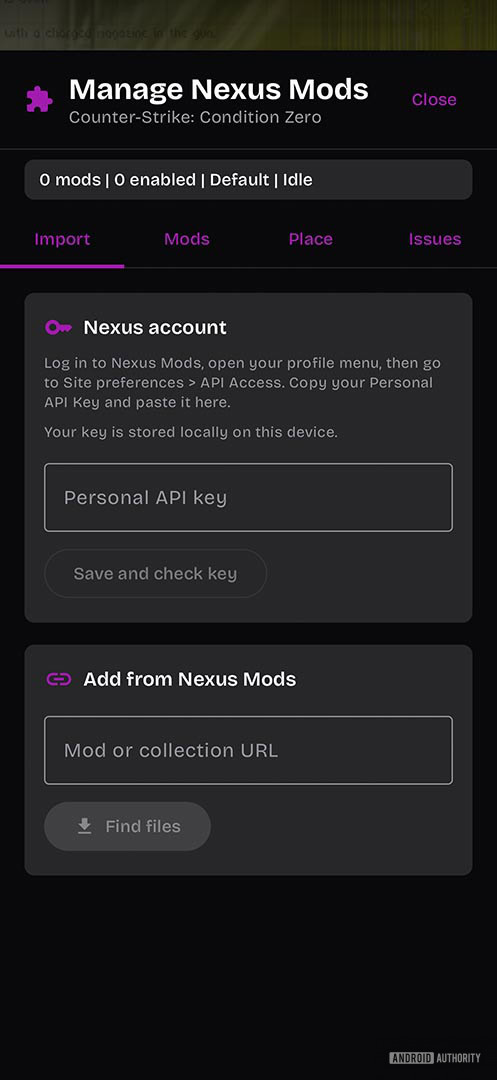
- Open the game in GameNative and locate the new mod-management tools. This release adds file and Nexus collection import as well as installed-mod controls.
- Sign in to Nexus Mods only when you need integrated downloads; otherwise import a file obtained legitimately from the mod page. Read the author’s dependencies, instructions, and version notes.
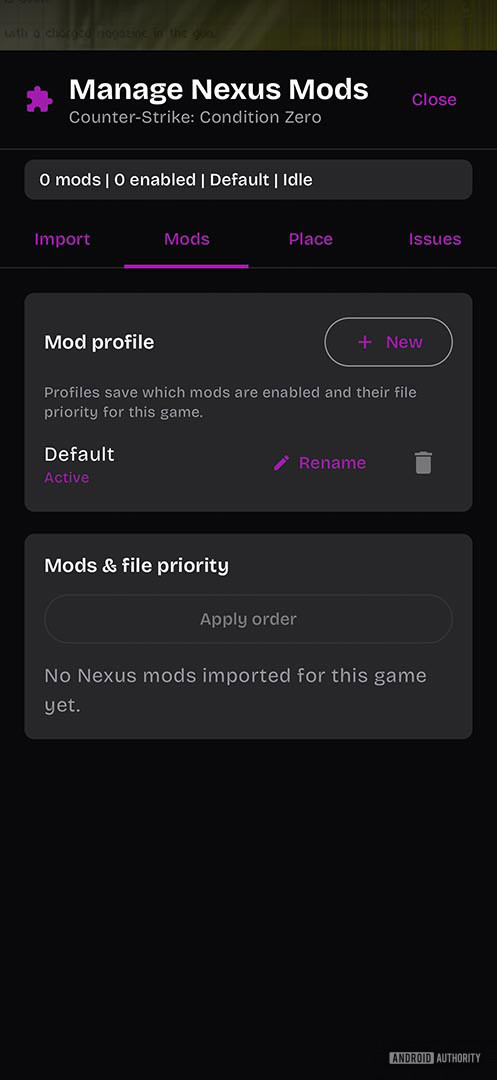
- Create or select a per-game profile, then enable one mod at a time. After each change, launch the game and test menus, save loading, and a few minutes of play before adding another one.
- If something breaks, disable the latest mod in that profile instead of reinstalling everything. Profiles are valuable precisely because they isolate a change and make a rollback clear.
What changes in practice
The built-in support moves GameNative a little further from “an environment where a PC game might run” towards a tool that is manageable when you want to customise it. Importing, profiles, and enable/disable controls do not remove uneven compatibility, but they make faults diagnosable. If a change fails, you know which one to turn off; without that structure, the usual outcome is a game that will not boot and an evening spent reconstructing which file went where.
The release also adds multi-controller support, hot swapping, and Steam and Workshop fixes. They should not be read as a promise that every Skyrim, Rain World, or other PC-game mod will work on a particular phone. The release notes themselves call out targeted Workshop fixes, a useful reminder that this area is still moving. Check real compatibility game by game, rather than loading a huge collection on the first try.
Limits worth respecting
This is a prerelease, so regressions are possible, and neither every game nor every mod is designed for an Android environment. Avoid mods that need unavailable components, do not overwrite a primary save, and do not download packages from opaque sources. Game and mod licences still apply; GameNative does not make unauthorised files legitimate.
The practical conclusion is simple: the new integration reduces manual work, not the need for checks. With backed-up saves, a clean profile, and one modification at a time, Nexus Mods support is a welcome update. Skip those steps and even the nicest interface becomes an efficient crash generator.
In brief
- GameNative v1.1.1 prerelease adds Nexus Mods, collections, and per-game profiles.
- The project lists Android 8–14 for the standard build; the XR variant is separate.
- Get the base game working before you enable one mod at a time.
- Backups, mod requirements, and game-specific compatibility remain essential.
Sources
- Android Authority: GameNative adds Nexus Mods support (July 15, 2026)
- GameNative: v1.1.1-prerelease official release notes and download (July 15, 2026)