Motorola’s Signature 27 is set to become the first Motorola phone officially supported by GrapheneOS, but that confirmation is not an installation guide. GrapheneOS identified it as the initial supported model on September 22, 2026, then said that phones sold with the operating system already installed are planned while the details are still being worked out.
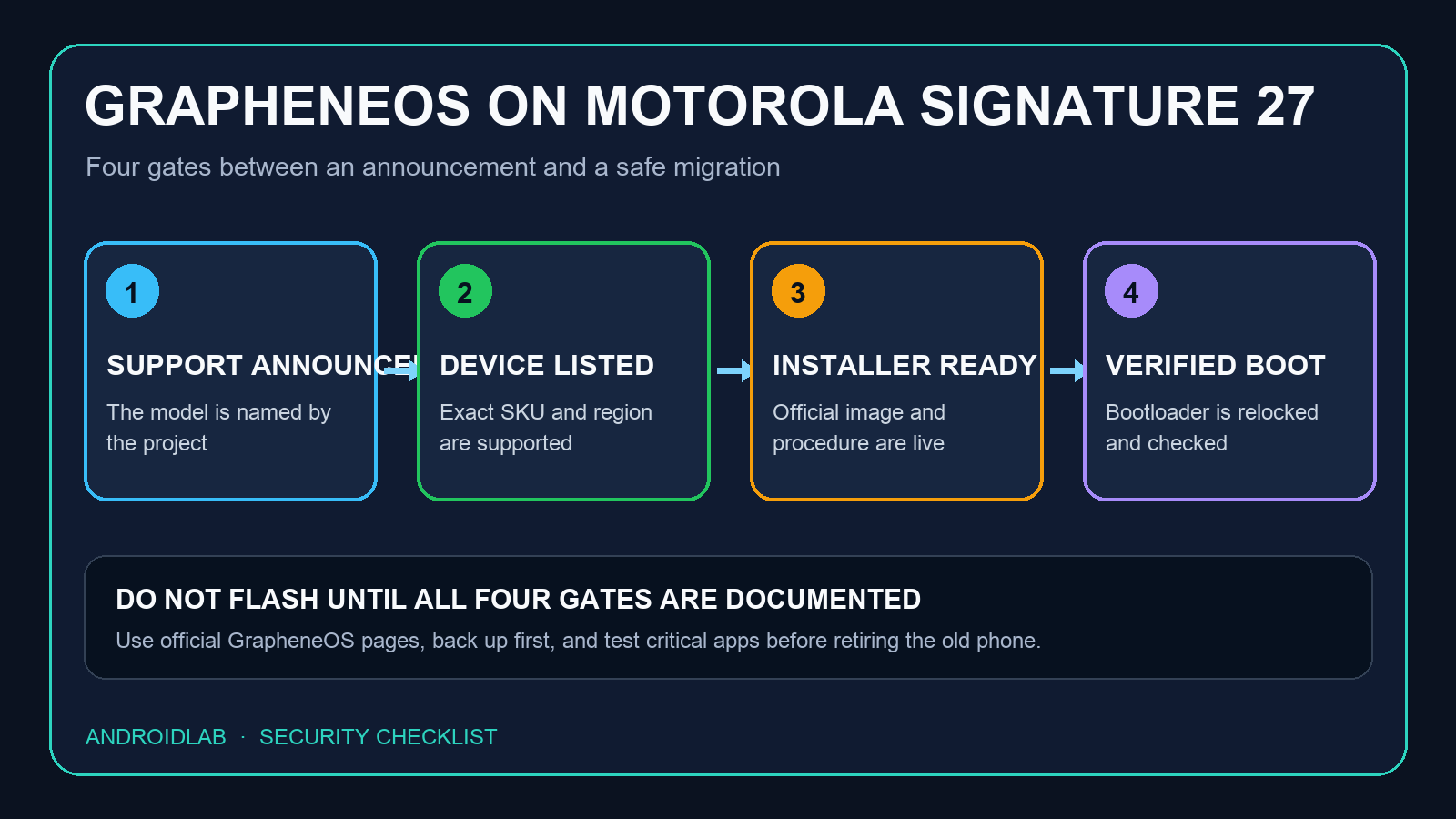
The distinction matters. A confirmed target device, a downloadable release and a retail phone shipped with GrapheneOS are three different milestones. As of September 25, the Signature 27 is not listed in the project’s public web installer, and neither GrapheneOS nor Motorola has published a complete installation, pricing or availability plan.
What has actually been confirmed
In an official GrapheneOS post on X, the project answered that the Signature 27 would be the “initial supported phone” and told readers to wait for official news. A second GrapheneOS post said that devices sold with GrapheneOS installed are planned, but that the details still need to be decided.
Independent reports from 9to5Google and Android Central both identify the Signature 27 as the first Motorola model in the support plan. They also agree on the missing pieces: there is no confirmed date for GrapheneOS availability on the phone, and the installation route has not been documented.
This is a meaningful expansion because GrapheneOS has historically limited official releases to hardware that meets strict security and update requirements. It does not mean that GrapheneOS is now available for Motorola phones in general. Support is model-specific, and even regional or carrier variants can differ in bootloader policy.
Do not buy on the announcement alone
The practical mistake would be to treat “support planned” as “ready to flash.” Before buying a Signature 27 specifically for GrapheneOS, verify all of the following from official project documentation:
- The exact model and regional SKU appear on the supported-device list. A product family name is not enough if radio firmware, bootloader settings or carrier restrictions vary by market.
- A release is published by GrapheneOS. The project’s official web installer should explicitly recognize the device before you connect it or change any developer setting.
- The official procedure supports relocking the bootloader. GrapheneOS considers an unlocked bootloader an incomplete and insecure installation. Do not assume that a generic Android flashing guide is an acceptable substitute.
- The update commitment is clear. Check how long Motorola will provide firmware and security updates for this specific model, and how GrapheneOS updates depend on that vendor support.
- Your critical apps have a migration plan. Banking, identity, work-profile, eSIM and device-management apps may apply their own integrity rules. Check the apps you actually need, not a generic compatibility list.
Our earlier analysis of GrapheneOS and Motorola requirements, published in Italian, explains why bootloader relocking, verified boot and timely firmware are more important than the logo on the box.
Preinstalled and self-installed are not the same
A factory or specialist retail option with GrapheneOS already installed could remove the most error-prone part of migration. It could also make the security state easier to verify at first boot. But the project’s wording is deliberately cautious: preinstalled devices are planned, while sales channels, regions, support responsibilities and timing remain unspecified.
A self-install route has different tradeoffs. The current GrapheneOS procedure for supported devices unlocks the bootloader, wipes user data, flashes the signed release and then relocks the bootloader to restore full verified boot. Locking also wipes data, so the correct sequence is to finish the installation and verification before restoring personal files or signing into accounts.
That description explains the security model, not the future Signature 27 button sequence. Motorola-specific instructions should come from GrapheneOS. Copying commands written for a Pixel, using an unofficial image or leaving the bootloader unlocked would defeat the reason for choosing this operating system in the first place.
A safe readiness checklist
Use this order once the phone and official release exist:
- Match the hardware. Compare the model number and region with the GrapheneOS supported-device page.
- Back up before unlocking. Treat bootloader changes as destructive. Keep authentication recovery codes outside the phone.
- Use only grapheneos.org. Start from the project’s installation page and verify that the browser, operating system and USB setup meet its stated prerequisites.
- Follow the complete sequence. Do not stop after flashing. Relock the bootloader exactly when the official guide instructs you to do so.
- Verify the installation. Check the verified boot result and the official signing key before loading personal data.
- Test essential services first. Calls, mobile data, eSIM, camera, notifications, banking and work apps deserve a short acceptance test before the old phone is erased.
- Choose the Google Play model deliberately. GrapheneOS can install Google Play as regular sandboxed apps. Add it only if your app requirements justify it, and grant permissions profile by profile.
The official installer currently warns buyers of supported phones to avoid carrier variants that disable bootloader unlocking. That warning is written around today’s supported hardware, so it should not be projected mechanically onto every Signature 27 SKU. The safe rule is simpler: wait for GrapheneOS to name the compatible variants rather than trusting a retailer’s vague “unlocked” label.
What this changes for Android privacy
GrapheneOS moving beyond Pixel would create a second serious hardware path for users who want hardened Android without treating security as a collection of removable apps. That matters more than another privacy mode or marketing dashboard. A secure alternative operating system needs cooperation below the interface level: firmware updates, verified boot, hardware-backed keys and a bootloader that can be safely relocked.
It could also test whether an Android manufacturer can support a privacy-focused operating system without turning it into a one-off enthusiast edition. The real measure will be maintenance: prompt firmware releases, a clearly supported sales channel and documentation that remains valid after launch.
For now, the Signature 27 is a credible target, not a finished GrapheneOS product. Keep the announcement on the shortlist, but keep your wallet closed until the supported-device page, release downloads and exact installation path all agree.
In brief
- GrapheneOS has confirmed the Motorola Signature 27 as its initial supported Motorola phone.
- Devices sold with GrapheneOS preinstalled are planned, but sales and timing details are unresolved.
- The Signature 27 was not yet present in the public GrapheneOS web installer on September 25.
- Wait for an official release and exact model support before changing bootloader settings.
- A complete secure installation must restore verified boot by relocking the bootloader.
- Check critical app, eSIM, banking and work-profile requirements before migrating.
Sources
- GrapheneOS on X: confirmation of the initial supported phone, primary statement published September 22, 2026 and verified through the official X embed on September 25, 2026.
- GrapheneOS on X: preinstalled devices are planned, primary statement published September 23, 2026 and verified through the official X embed on September 25, 2026.
- GrapheneOS WebUSB installer, official installation, bootloader locking and verification documentation checked September 25, 2026.
- GrapheneOS FAQ: supported devices and security requirements, official documentation checked September 25, 2026.
- GrapheneOS usage guide: sandboxed Google Play, official documentation checked September 25, 2026.
- 9to5Google: “Motorola Signature 27 confirmed to support GrapheneOS”, published September 24, 2026.
- Android Central: “Motorola just gave privacy fans a big reason to consider the Signature 27”, published September 24, 2026.