On this page
A Raspberry Pi running AROS does not automatically become easy to manage from a PC. Copying an archive, checking a version or running a command without returning to the Pi’s keyboard needs a connection that holds up beyond the first demonstration. BebboSSH AROS 1.0.5 adds the aarch64 package and addresses exactly those details: host-key confirmation, console keys and clean server shutdown.
The operating system matters here: these binaries are for AROS on the Raspberry Pi, not Raspberry Pi OS or an ARM Linux distribution. The original project is Stefan “Bebbo” Franke’s BebboSSH; Michele Dipace maintains the AROS fork. Upstream version 1.45 and the port’s 1.0.5 numbering are not two updates in the same package series.
The Pi release, without mixing up the three packages
The source is shared, but the kits are not interchangeable. The aarch64 build uses the aarch64-aros crosstools and the raspi-aarch64 port’s sysroot. The documented hardware validation concerns a Raspberry Pi 400, with the September 12, 2026 AROS build, Ethernet and DHCP. Having a 64-bit ARM CPU is not sufficient to declare another board supported.
| Kit | Target and declared status | Remote command execution |
|---|---|---|
| i386, alt-abiv0 | 32-bit AROS One; stable in 1.0.5 | ssh host command uses a child task |
| x86_64, mincrt | 64-bit AROS; stable in 1.0.5 | Synchronous: a long command keeps the daemon busy |
| aarch64, raspi-aarch64 | First AROS Pi release; validated on the Pi 400 | Follows the i386 path, with a child task for remote exec |
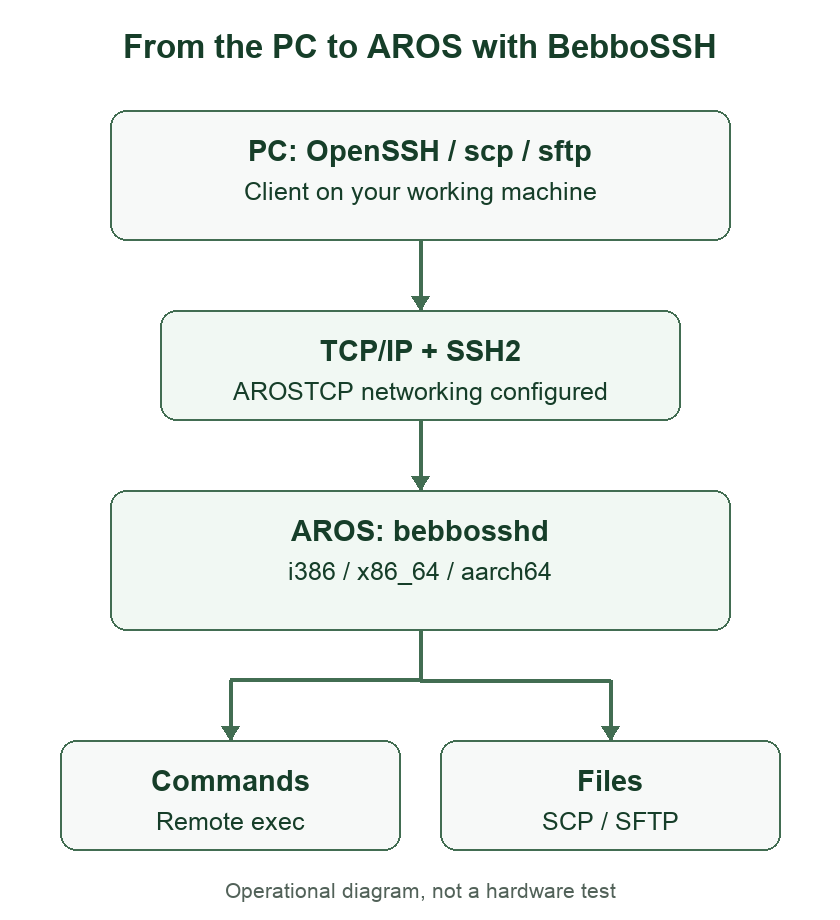
Every kit contains four executables: bebbosshd accepts connections, bebbossh is the SSH client, bebboscp copies files and bebbosshkeygen generates Ed25519 keys. Cryptography is linked statically: the current AROS port does not require a separate libcryptossh.library, unlike other contexts in the Amiga upstream project.
The 1.0.5 fixes matter in everyday use
The client finally waits for the host-key answer
On the first connection, bebbossh and bebboscp asked whether to accept the server’s key, but could read the command line left in the input buffer by RunCommand() as the answer. The result was failed to verify the host before the user had a chance to respond. Version 1.0.5 clears that initial input and allows time for an answer.
This does not remove the security check: it fixes the interaction. The key still needs verification; an unexpected change on a known host should not be accepted blindly.
Cursor keys and characters should not fight over one packet
In the daemon’s shell, Shift+Left could print [1;2D instead of moving the cursor. If a cursor sequence and the following character arrived in the same packet, that character could also be lost. The parser now preserves both. That matters when correcting a path or pasting text, even if SSH login itself works perfectly.
The aarch64 client also fixes console detection: the code distinguishes the C library’s FILE from the AmigaDOS handle returned by Input(). This avoids treating cursor keys as raw input in the documented case.
On aarch64, shutting down the server is part of the port
The release fixes timer-request and keyboard-resource management. On aarch64, some calls bound to amiga.lib allocations while cleanup followed a different path: the daemon could work and then crash on exit. Matching Exec calls align resource creation and release. Starting, interrupting and restarting the service is therefore a practical check, not a packaging footnote.
What was validated, and on which machine
The aarch64 release checklist records the five crypto self-tests, 100 consecutive logins, SCP/SFTP transfers in both directions and stress with no delay between connections on the Pi 400: 20 iterations and 80 transfers of up to 1 MiB. It also documents byte-for-byte comparisons, overwriting with a shorter file, two simultaneous daemons, native clients and restarting after Break.
These are results recorded by the project, not benchmarks run while preparing this article. They do not predict network throughput on every Pi. The older 68k processor measurements in the upstream README are not measurements of this ARM port either.
Hardware and VM results need separating: the aarch64 notes report very slow reception and a failed upload with QEMU raspi3b and usb-net, while the same transfers pass on the Pi 400. Using that VM result to judge the real board’s networking would be misleading.
First installation on the Raspberry Pi
Download the aarch64 kit, extract it and copy the directory to the AROS volume, for example SYS:BebboSSH. Configure AROSTCP networking first. From the AROS Shell:
cd SYS:BebboSSH
copy sshd_config.example sshd_config
copy passwd.example passwd
ed passwd
ed sshd_config
bebbosshkeygen -f ssh_host_ed25519_key
stack 262144
bebbosshd
Also check the initial directory in sshd_config: the example contains HomeDir DH0:. If you use SYS: on the Pi, choose an existing path, such as HomeDir SYS:BebboSSH. Before starting the daemon, replace the demonstration credential in passwd with your own username and password. The bootstrap format is one username password pair per line. The host key identifies this installation: generate it at first setup, protect it and retain it during upgrades rather than sharing it between machines.
The examples use PROGDIR: paths. Keep bebbosshd, sshd_config, passwd and the key in the same directory. Copying the daemon to C: without adjusting those paths makes it look for its configuration there too. The clients can be copied to C: for convenient access.
On the Pi’s FAT SYS: volume, protect may report an error: the release notes explain that the binaries remain executable. For autostart, the checklist provides scripts and requires AROSTCP at boot plus a short delay before the daemon. Start manually first, then move to autostart once networking and login work.
From the PC: check a version and move a file
From a PC with OpenSSH, try these commands, replacing AROS_IP with the Pi’s address and user with the configured account:
ssh user@AROS_IP Version
scp archive.lha user@AROS_IP:SYS:BebboSSH/
sftp user@AROS_IP
Version is a useful first short command; copying the archive checks a writable path. There is no need to start with a full-screen editor session. You can also save the output on the PC:
ssh user@AROS_IP Version > aros-version.txtThat redirection runs in the PC’s shell. It is not equivalent to sending Version > file to AROS’s remote shell, which does not yet support such redirection. If the problem is a first connection from the native AROS client, try bebbossh user@host from its console instead: that is the path affected by the host-key prompt fix.
Limits worth knowing before using it for work
- This is not a complete PTY shell. Simple commands work; stdin-driven programs and remote pipes or redirection are rejected with status 2.
- A command typed in the interactive shell runs inside the daemon: other connections wait and Ctrl-C does not interrupt it. On i386 and aarch64,
ssh host commandexec uses a child task; on x86_64 it remains synchronous. - On i386 and aarch64, the 30-second timeout with status 124 does not kill the command: work may continue. Do not confuse it with successful cancellation.
- On the Pi 400, tests report freezes with
-v5debug logging to a console during heavy transfers. Keep the default level and use debug for short diagnostics. - On x86_64, an unmounted volume can open a requester that blocks the daemon. Options for
cd, SFTP timestamps and links are opt-in; their test coverage is not identical. - Preserving timestamps with OpenSSH
put -pstill has a limitation: a timestamp set before closing may be updated by AROS when the file closes.
Modern ciphers do not turn the underlying system into an isolated, audited Linux server. The porting notes also document limits in the x86_64/mincrt random generator, described as a best-effort mixer rather than a true CSPRNG. Start experimenting on a controlled network and do not treat the SSH name as a guarantee for the entire machine.
Version 1.0.5 downloads and the right sources
| AROS target | GitHub release | Aminet package |
|---|---|---|
| i386, alt-abiv0 | 1.0.5 ZIP and tar.gz | i386 LHA |
| x86_64, mincrt | 1.0.5 ZIP and tar.gz | x86_64 LHA |
| aarch64, Raspberry Pi | 1.0.5 ZIP and tar.gz | aarch64 LHA |
The releases include checksums for verifying download integrity; all three public ZIPs match their declared values. All three Aminet package pages also list 1.0.5: they are not merely pointers to the original 68k package. The fork’s public repository is on GitHub. The licence is GPLv3 or later; upstream attribution and licence texts must stay with redistributions.
The development branch is already beyond those binaries
The October 13 commit adds protection for DOS packet logs without an associated shell channel: it avoids a null dereference before the logging level can filter the message. This is a later fix. The three public 1.0.5 tags point to commit 188e301, so that fix must not be attributed to the already downloadable 1.0.5 ZIPs.
That is the useful way to read this release: an actual ARM kit, small client defects removed and explicit operational boundaries. The first BebboSSH AROS article on RetroLab covers the port’s history and its place in the lab; the repository’s versioned instructions remain the reference for installation and building.