
On this page
EdgeSnap classic 0.51 beta is on Aminet: my window-snapping system reaches the classic Amiga, with an m68k package for the 68000 and later processors. Dragging a window towards an edge or corner brings up a preview frame; releasing the button places it in that half, quarter or maximised screen area.
The main usage target is AmigaOS 3.1 and later, but the stated minimum is AmigaOS 2.04. A graphics card is not required: the classic path considers both AGA and RTG. This is the first public release of this branch, with edgesnap.library 2.28, separate from the EdgeSnap packages for OS4, MorphOS and AROS.
More than putting windows into halves
The trigger is the pointer, not the window’s border. Sides select halves, corners select quarters and the top edge maximises. The preview shows the destination before release, while dock and panel detection keeps those areas clear.
Two tiled windows can share a divider: dragging it resizes both. A snapped window dragged away from the zones regains its previous size under the pointer. Configurable shortcuts are also available: Ctrl Alt with cursor keys for the main actions, Ctrl Alt C to centre, and Ctrl Alt Z for the nine-cell selector under the mouse.
Native preferences without MUI or ReAction
For this branch I chose GadTools: preferences run on 3.1 without adding those toolkits. Zones, sensitivity, push against an edge, appearance, docks and margins are grouped in the settings window. The same parameters can come from icon tooltypes, the preferences file or the command line.
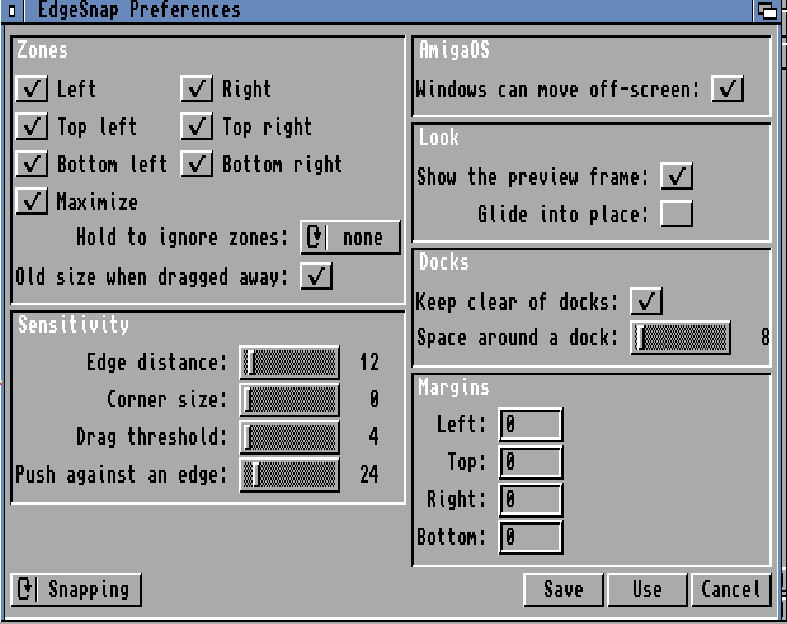
The screenshot above comes from the project repository and shows 0.51 preferences on AmigaOS 3.2.3. It is authentic documentation, not an interface invented for the cover and not a new hardware test performed for this article.
Screen edges on AmigaOS 3.2: when to restart
Restart after the first installation on AmigaOS 3.2. The installer enables IControl’s Can Move Off-screen setting, which the system takes up at startup: the dragged window can move beyond the limit and the pointer can reach the edge. The AmigaOS section in preferences lets you turn the setting back.
Until that restart, with the option off, and on 3.1 or earlier systems that lack it, the window stops at the limit. Keep pushing the mouse against the edge to activate the preview. The distance is PUSHPX, initially 24 pixels; zero disables that extra push. When windows can move off-screen, the push is not counted.
Glide into place starts disabled: it can be slow on a 68k without a graphics card. On AmiKit, while EdgeSnap runs, I temporarily disable MCP’s own window moving in ENV, restoring it on exit without changing its saved preferences. The KEEPMCP=YES tooltype leaves MCP unchanged instead.
A commodity in front of a shared library
EdgeSnap does not patch system vectors. The commodity’s input handler gathers events and signals the main task; Intuition calls happen in that task, not in input.device context. Layout logic and state belong to edgesnap.library, which other programs can use too: this is not a new window manager replacing Workbench.
The EDGESNAP ARexx port exposes commands including SNAP, RESTORE, QUERY, SELECT and PREFS. TITLE selects a window by pattern. RexxMast must be running to execute scripts; from the Shell, rx "ADDRESS EDGESNAP 'SNAP LEFT'" acts on the active window. The bundled esnaptest program is an API example.
Download and install beta 0.51
Download the EdgeSnap classic m68k 0.51 LHA package, listed on the Aminet page with its readme and contents. The classic GitHub repository contains the source; at verification time it did not offer a separate GitHub release to list as a binary download.
After extracting it, open the Install icon: the library goes into LIBS:, the commodity into SYS:WBStartup, preferences into SYS:Prefs, and the manual where you choose. S:User-Startup is not changed. Updating means installing again, normally without restarting: that does not remove the restart required by the first IControl setting change on 3.2. Exchange can enable, disable or stop the commodity.
What was verified and what still needs testing
The documentation records 0.51 tests on emulated AmigaOS 3.2.3, with AGA and a graphics card, and on emulated 3.1; for earlier versions it records a stock A1200, Vampire and PiStorm with AmiKit. AmigaOS 3.1.4 has not been tested yet. The stated 2.04 minimum is not a new certification of every configuration.
For this article I studied the source and manual, verified the Aminet archive’s version and integrity, and ran all 13 C89 core host test suites on the Mac successfully. These checks are not new tests of the binary on an Amiga. Report problems through the classic repository’s issues, including the machine, system and reproduction steps.
The project remains free and open source under the MIT licence; support is voluntary. The icons are by Carlo Spadoni. Amiga snapping did not begin here: GoSnap is relevant prior art, while my choice combines dragging, shared dividers and a reusable library. For the branch on other systems, see the EdgeSnap 0.5 article.
Cover: conceptual illustration generated with OpenAI, not a screenshot of the program.