Starting on June 30, 2026, Google Play is changing how payments can work inside Android apps, at least in the first rollout wave: the United States, the United Kingdom and the European Economic Area. This is not the fantasy version where every platform fee disappears overnight. Developers can offer alternative billing or link users to their own website, but Google is separating the service fee from the billing fee rather than removing the store economics entirely.

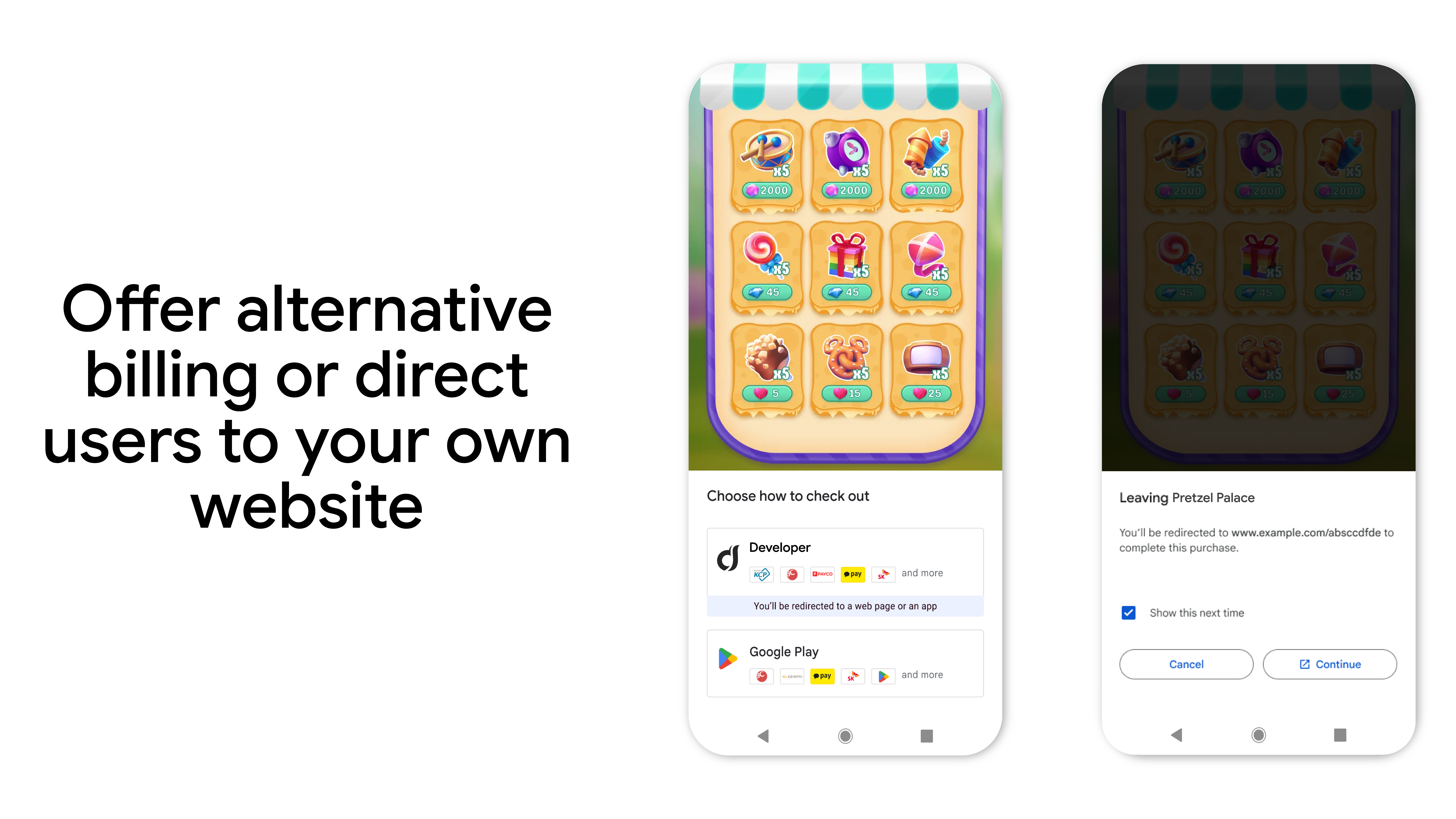
The practical point is clear: if you build an Android app, sell digital content or run subscriptions, you need to review pricing, checkout screens, tax handling, customer support and conversion metrics. If you are an Android user, you may start seeing more choices between Google Play Billing, a developer-managed payment option or an external checkout page. That is more freedom, but it also changes who handles receipts, refunds and subscription support.
Google published the updated model on the Android Developers Blog on June 24, 2026. The first phase starts in the US, UK and EEA, with more markets to follow. The important distinction is between the fee for Google Play as a distribution platform and the fee for using Google’s payment processing. The old “30 percent” shorthand is now too blunt for what developers actually have to calculate.
Requirements: who can use it and where it starts
The new options apply to developers offering digital content or services through apps distributed on Google Play. In the initial phase, Google lists the United States, United Kingdom and EEA. For the United States, Google’s Play Console Help page also tracks policy changes connected to the Epic Games injunction: developers can communicate alternative payment methods, use in-app payment methods other than Google Play Billing and link to external transactions, as long as they comply with the relevant programs.
The operational checklist is less glamorous than the headline, and that is the part that matters. Before changing checkout, verify the market, the product type, the applicable Google Play program, tax handling by the external provider and the refund path. A “pay on our website” button without accounting, receipts and support is not openness. It is a production incident with nicer typography.
Fees: what actually changes
Google says the service fee starts at 10% on the first $1 million in annual earnings and also applies to auto-renewing subscriptions. For other transactions, rates depend partly on whether the user counts as a “new install” or an “existing install” relative to the regional rollout date. If the developer keeps using Google Play Billing, a 5% billing fee applies in the US, UK and EEA. If the transaction uses alternative billing or an external web link, that billing fee does not apply.
That detail is the reality check: external payment does not automatically mean a lower price for users. It gives developers more room to choose. They may reduce prices, absorb costs, offer web-only plans or change nothing at all. The real effect will depend on competition, margins and whether the developer wants the user experience to be clearer or merely cheaper on a spreadsheet.
Developer procedure: checks before rollout
- Check in Play Console whether your app qualifies for billing choice, external payments or external content links in the markets you serve.
- Review the payments policy and UX guidelines. Google allows custom choice screens, but they still have to match the program requirements.
- Map each product type: one-time purchases, subscriptions, digital content, upgrades, in-game consumables and web plans can have different operational consequences.
- Calculate pricing in three columns: Google Play Billing, in-app alternative billing and external web checkout. Include service fees, any billing fee, taxes, chargebacks and support cost.
- Prepare receipts, refunds, subscription cancellation and support outside Google Play. If users pay outside the store, they will still expect help inside the app.
- Test checkout with real market conditions, work profiles, tablets and slow connections. A flow that only works on the developer’s phone is not a flow.
Android user checklist
When an app offers external payment, check four things: who receives the money, where the subscription is managed, how refunds work and which payment method is stored. If the price is lower but the external page is unclear, the discount can turn into a support ticket. For major services this can be manageable; for unknown apps, caution is still a security feature.
Before paying outside Google Play, ask: will I get a clear receipt? Can I cancel the subscription from the website? Is the domain the developer’s official domain? Does the price show taxes and renewal terms? If any answer is vague, stop. A more open Android ecosystem does not mean a less verified checkout.
What really changes
For AndroidLab, this matters because Google Play is moving away from a single mandatory checkout model toward a more layered commercial platform. It is more open, but also more complex. Serious developers can build web offers, business plans, discounts and more direct user relationships. Users get a conditional promise: more choice, as long as apps explain where money, data and support responsibilities actually go.
This also connects with the wider Google Play direction. The same store that is adding more AI-driven discovery now has to make more complex payment choices understandable. If the interface does not explain fees, refunds and responsibility clearly, technical freedom becomes operational noise.
In brief
- New Google Play billing options start on June 30, 2026 in the US, UK and EEA.
- Developers can offer alternative payments or external links under Google Play programs.
- The service fee is separate from the billing fee; Google Play Billing can add 5% in the initial markets.
- For Android users, lower prices are possible but refunds, receipts, support and official domains matter.
- The practical checklist is policy, UX, accounting, support and cancellation flows before changing checkout.
Sources
- Android Developers Blog – Expanded billing choice and lower fees on Google Play
- Google Play Console Help – Policy update for developers serving users in the US
- The Verge – Google is finally opening the Play Store to outside payments
- MacRumors – Google lowering Play Store fees and allowing alternative payments worldwide