On this page
Google has expanded Android Earthquake Alerts from 98 countries and regions to more than 200, and it is changing the alerts themselves. The announcement is dated 15 October 2026. The short version: the system now uses three alert levels, and the most detailed one, Be Ready, gets a map and a magnitude estimate in the coming months.
For anyone with an Android phone in a seismic area, that is useful, but the practical part is what you do with it. Three things matter: whether the feature is on, what each alert level actually tells you, and where Google itself says the system is limited. The limits are the part most news posts skip.
What actually changes
Google describes the Android Earthquake Alerts System as the world’s largest mobile-based earthquake detection network and says it has sent more than one billion alerts since 2021. The expansion takes coverage to more than 200 countries and regions, and the blog names Panama and Guatemala among the new ones. The announcement does not promise faster warnings. What it adds is coverage plus more information inside the Be Ready alert.
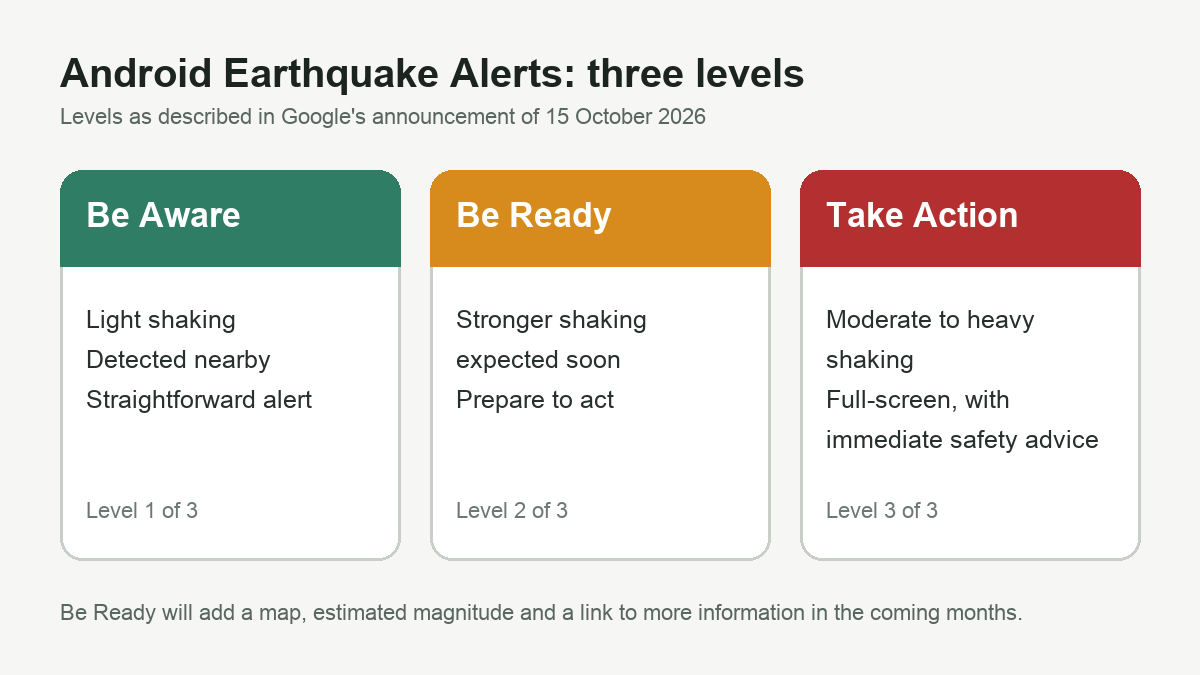
There are three levels:
- Be Aware: a simple alert for estimated light shaking, telling you that an earthquake has been detected nearby.
- Be Ready: a more detailed alert for stronger shaking, asking you to prepare to take action.
- Take Action: a full-screen alert for moderate to heavy shaking, with immediate advice on how to stay safe.
Google says that in the coming months the Be Ready alert will also show a map of the area where shaking was detected, an estimated magnitude, suggested actions and a button to learn more as information comes in. Those extras are not described as available yet, so do not expect them on every phone today.
How to check the setting
According to Google’s Help page, earthquake alerts are on by default where the feature is supported. To check or change them, open Settings, go to Safety & emergency, and look for Earthquake Alerts. Manufacturers rename menus, so if the label is different on your phone, use the Settings search box and search for “earthquake”.
Two details matter more than the toggle itself:
- Location: alerts for nearby earthquakes of magnitude 4.5 and above use your approximate location. Google says coarse location is used to decide which devices receive an alert, and that this information is not used to identify or locate a specific user.
- Detection: Google’s Help page says that to stop your phone from contributing to earthquake detection, you should turn off Google Location Accuracy. Changing a location switch can affect other features too, so check before you change it.
Where the system is still limited
The Help page lists limits that should shape how you read an alert:
- Earthquake alerts are not supported in all areas, and you only receive them in supported countries.
- Not all earthquakes can be detected.
- Magnitude and shaking intensity estimates may have errors.
- An alert can arrive before, during or after shaking begins.
- Occasionally you may get an alert and not feel an earthquake where you are.
The practical takeaway is simple. An alert is an early signal, not a guarantee. If it arrives after the shaking has started, the advice in the notification still applies, but the seconds you were counting on are gone. Keep your own plan for the moment the ground moves.
Check your country before you trust it
The blog says coverage now reaches more than 200 countries and regions, and it names Panama and Guatemala. When we checked the Google Help page on 15 October 2026, its list of countries where the Android Earthquake Alerts System is active had roughly 100 entries and did not include Panama or Guatemala. The page may simply lag behind the announcement, but the practical rule is the same: do not assume coverage from the blog alone. Look at the alert settings on your phone and the current Help page. If your country is missing from both, treat the alert as unverified.
In short
- Google has expanded Android Earthquake Alerts to more than 200 countries and regions, announced on 15 October 2026.
- The three levels are Be Aware, Be Ready and Take Action. The Be Ready map and magnitude estimate are coming in the coming months.
- The setting sits under Settings, Safety & emergency, Earthquake Alerts. Menu names can change by manufacturer.
- Alerts use approximate location. Turning off Google Location Accuracy stops your phone from contributing to detection, so check what else it affects.
- Alerts can arrive before, during or after shaking, and not every earthquake is detected.