On this page
Google has put a date on the global phase of Android developer verification. In a post published on November 19, the Android team says the worldwide rollout begins in January 2027 with seven app distributors, then widens over several months until it covers every installation source on certified Android devices. If you only install apps from Google Play, you will probably never notice. If you install APKs from project websites, small stores or open-source catalogs, one detail deserves attention now: the opt-out for unregistered apps takes a full day to switch on, and you cannot rush it on the day you need it.

What Google announced
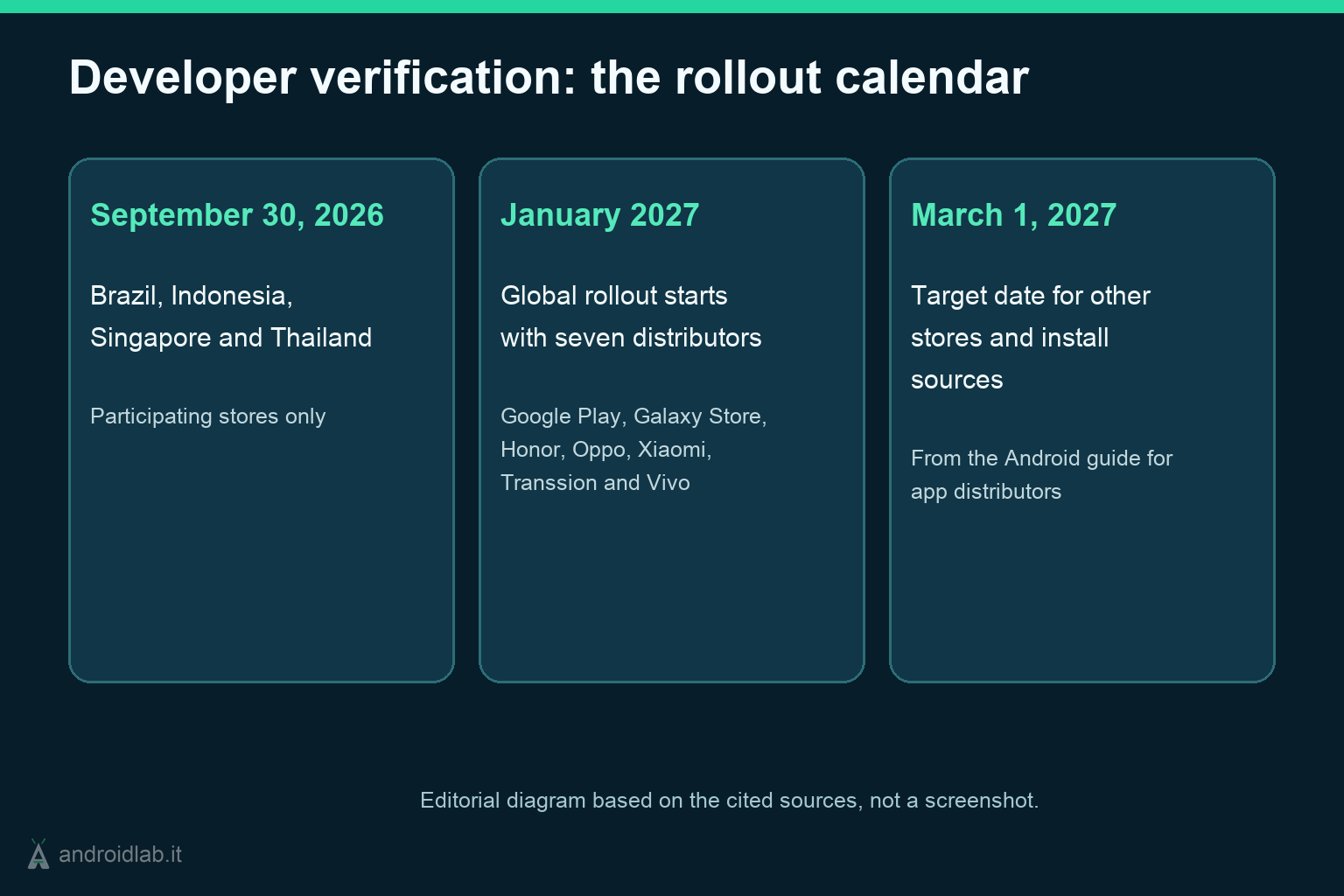
The requirement itself is not new. Apps installed on certified Android devices must be registered by a developer who has verified their identity with Google. Enforcement started on September 30, 2026 for participating stores in Brazil, Indonesia, Singapore and Thailand. The new post adds the calendar for everyone else:
- January 2027: the global rollout starts with Google Play, Galaxy Store, Honor, Oppo, Xiaomi, Transsion and Vivo.
- The following months: protections expand gradually to all countries and to all installation sources, which includes direct APK downloads and third-party stores.
- March 2027: Google’s guide for app distributors says the requirement will be in effect for other stores by then, and its planning table uses March 1, 2027 as the target readiness date.
Google has not published a country-by-country schedule, so nobody can tell you the day your phone starts enforcing the check. Plan around January and treat March 1 as the point where the transition is meant to be complete.
The check applies to certified Android devices running Android 8 or higher and, according to Google’s FAQ, it is delivered through Google Play services. An old phone that stopped receiving system updates years ago is still covered. Google also says that millions of apps have been registered since March and that they account for over 99% of Android app installs worldwide. That figure is Google’s own and it counts installs, not titles. Niche tools, abandoned utilities and one-person projects are where the remaining share lives, and those are the apps people usually sideload.
Who has to do something
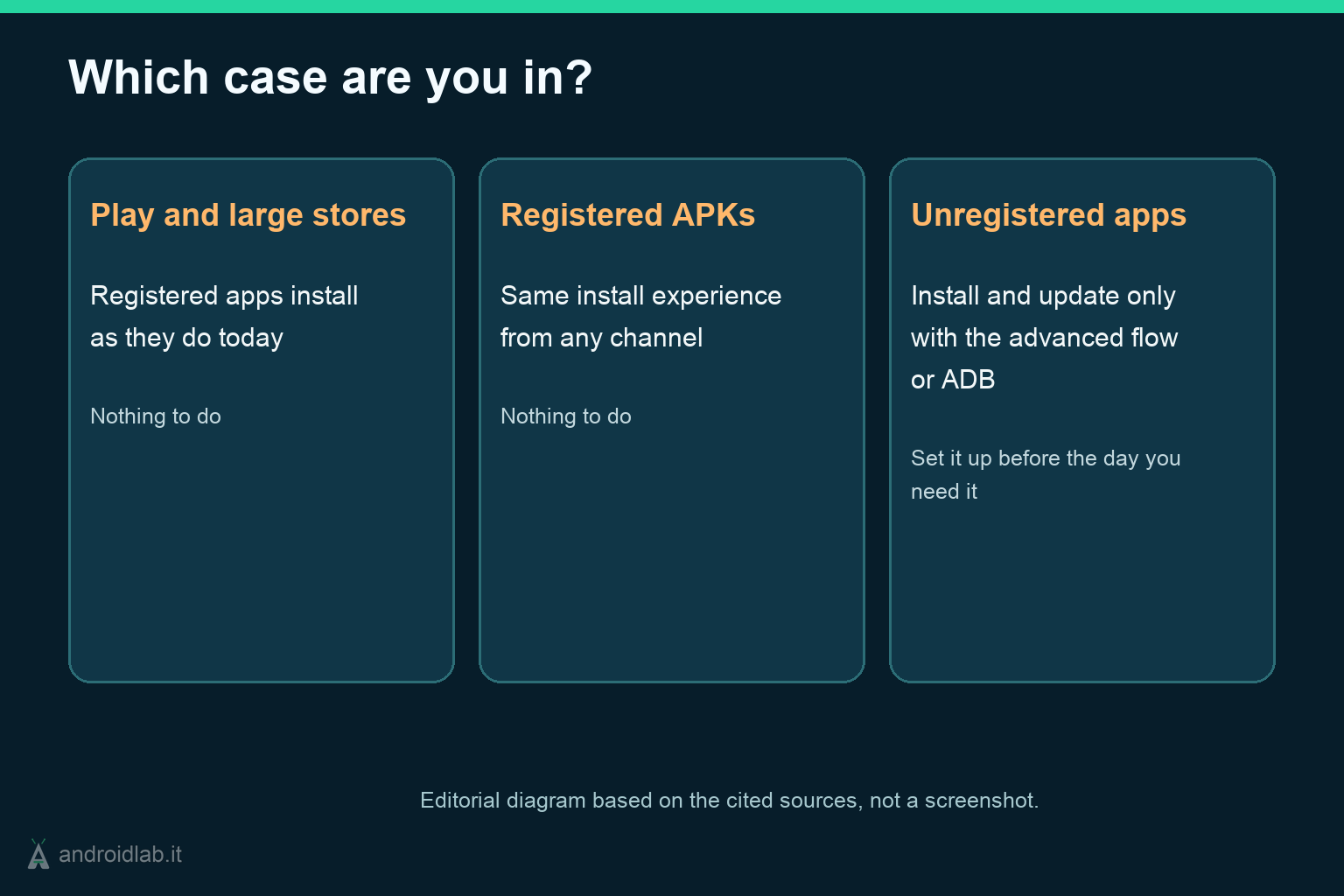
Sort yourself into one of three cases before worrying.
- You install from Google Play or a large manufacturer store. Nothing to do. Registered apps install the way they do today.
- You install APKs from developers who have registered. Also nothing to do. Google says the install experience stays the same whatever channel the app comes from, as long as it is registered.
- You rely on at least one app whose developer has not registered. You will need the advanced flow or ADB. This covers updates as well: the FAQ states that unregistered apps can only be installed or updated while the advanced flow is enabled or through ADB, and that updates fail otherwise.
The third case is harder to spot than it sounds. Google documents a status API for stores and developers, not a lookup page for users, so the practical way to know where an app stands is the developer’s own announcement. If a project you depend on has said nothing by now, ask.
The advanced flow, step by step
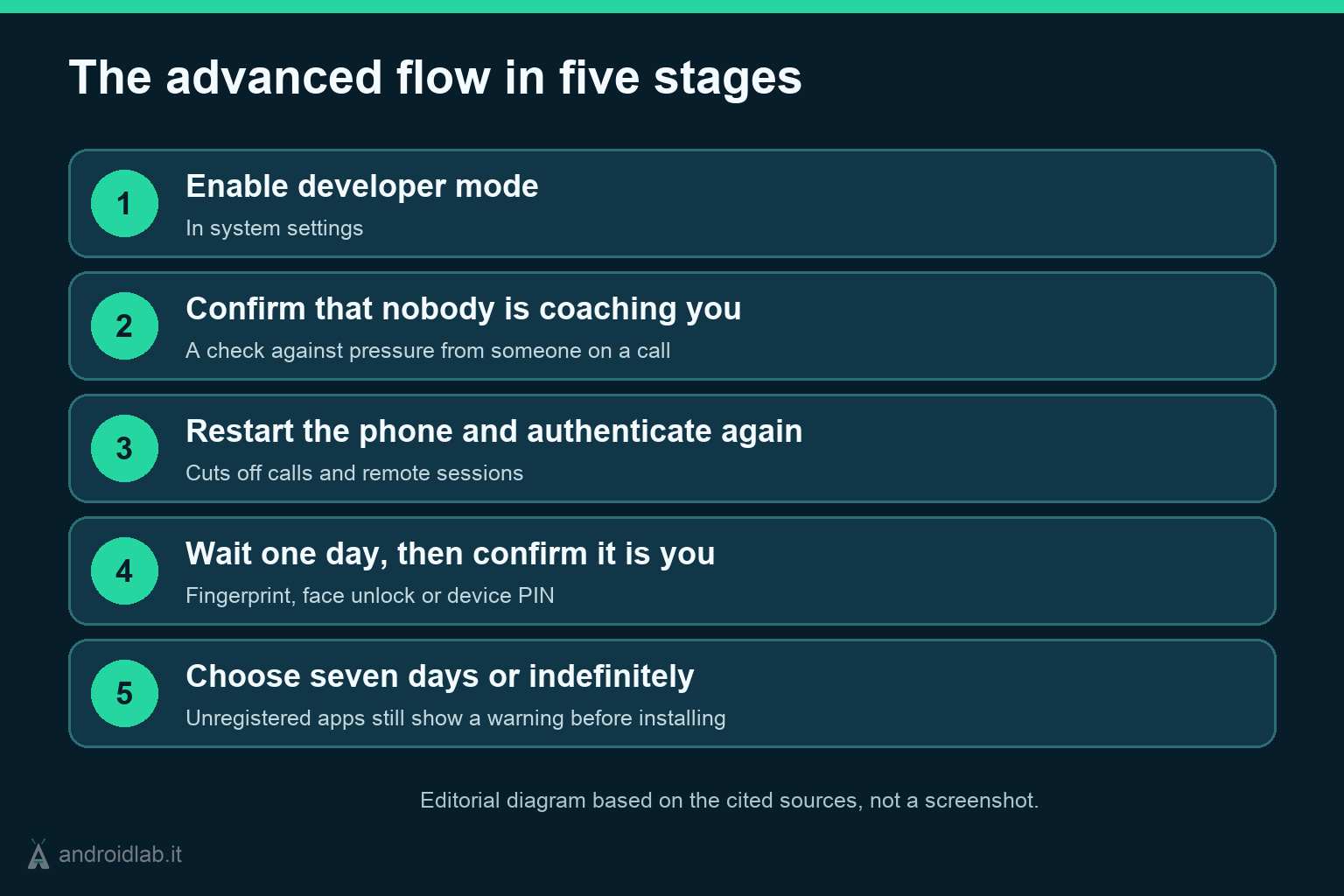
The advanced flow is Google’s opt-out for people who accept the risk of installing unregistered apps. The FAQ describes it in five stages:
- Enable developer mode in system settings.
- Confirm that nobody is coaching you. Android asks whether someone is talking you into turning the protection off.
- Restart the phone and authenticate again. Google’s stated reason is to cut off any call or remote session that a scammer might be using to watch the screen.
- Wait one day, then confirm it is you with fingerprint, face unlock or the device PIN.
- Choose how long it lasts: seven days or indefinitely. From then on an unregistered app still shows a warning, with an “Install anyway” button.
Android Authority reports where the switch sits on the device: in Developer options, open Apps from unverified developers and turn on Allow apps from unverified developers. If you cannot find it, search for it in Settings before assuming your phone does not have it.
A few answers from the FAQ save time:
- The wait happens once. It is not repeated for every app.
- You do not have to keep developer options on afterwards. That matters for banking apps that refuse to run with developer mode enabled.
- There is no ADB command that skips the wait. Google says this is not supported at this point.
- Installing with ADB from a computer works as before and is not subject to the wait.
Why the wait is a planning problem
Google is explicit about the purpose of the delay. Phone scammers keep the victim on a call and push them to disable protections immediately, and a 24-hour pause breaks that pressure. As a defense against coached installs, it is a reasonable design.
The side effect falls on legitimate use. The day you need an unregistered app in a hurry, because you are travelling, replacing a phone or fixing someone else’s, the system will make you come back tomorrow. Ars Technica reports that the setting is already live, so there is no reason to meet it for the first time under pressure. If you know you depend on unregistered apps, go through the five stages on a quiet day before January and pick the duration that suits you.
Ars Technica adds a second practical limit: only popular app IDs are cached on the device, so for less common apps the phone has to check with Google before installing. An offline install of an obscure APK may not behave the way it used to.
The opposite advice applies to phones you look after for relatives. Leave the advanced flow off. And tell them the pattern in plain words: if someone on a call asks them to turn on developer options and promises to call back tomorrow, that is the script this delay was built to interrupt.
What stays outside the check
- ADB installs. Google says developers remain free to install unverified builds through ADB.
- Managed devices. Apps distributed through an organization’s store on managed devices do not need to complete verification, because the IT admin has vetted them.
- Small circles. Limited distribution accounts let students and hobbyists share an app without a fee or a government ID. The November 19 post raises the cap from 20 to 50 authorized devices.
- Devices that are not Google-certified. The requirement targets certified Android devices. Our earlier guide on developer verification and LineageOS explains where custom ROMs stand.
- Sanctioned countries. The FAQ says the checks do not run on certified devices physically located in comprehensively sanctioned countries.
Do not confuse any of this with Registered App Stores, a separate program with its own fees and install flow. We covered it in Android Registered App Stores and sideloading.
What actually changes
Sideloading survives, but it stops being something you decide on the spot. On a certified phone, an unregistered APK now needs either a decision you made at least a day earlier or a computer with ADB. For most people that is invisible. For anyone who keeps old tools alive, tests builds from small projects or maintains devices for others, it turns into housekeeping: know which apps are unregistered, enable the flow in advance where you want it, and keep ADB working as the fallback.
For developers the cost is concrete and modest on paper: a full distribution account in the Android Developer Console carries a $25 fee and identity verification, and Google says registering an app takes less than ten minutes. The harder cases are the ones no fee solves. Developers in sanctioned countries cannot verify at all, and an app whose author has moved on will never be registered by anyone. Those are the installs the advanced flow will end up carrying.
In short
- Global enforcement of Android developer verification starts in January 2027 with seven distributors and expands over several months. Google’s distributor guide targets March 1, 2027 for the rest.
- It applies to certified devices on Android 8 or higher, through Google Play services.
- Unregistered apps can still be installed and updated, but only with the advanced flow enabled or through ADB.
- The advanced flow needs developer mode, a restart and a one-time wait of one day. It can stay on for seven days or indefinitely.
- If you depend on unregistered apps, set it up before January. If you manage a relative’s phone, leave it off.
- Expanding Android developer verification in 2027, Android Developers Blog, 19 November 2026
- Resources for app distributors, Android Developers
- Android developer verification: Frequently asked questions, Android Developers
- Android developer verification, Android Developers
- Android’s controversial sideloading rules go global in January, Android Authority, 19 November 2026
- Google will launch Android app verification requirement globally in January 2027, Ars Technica, November 2026