On this page
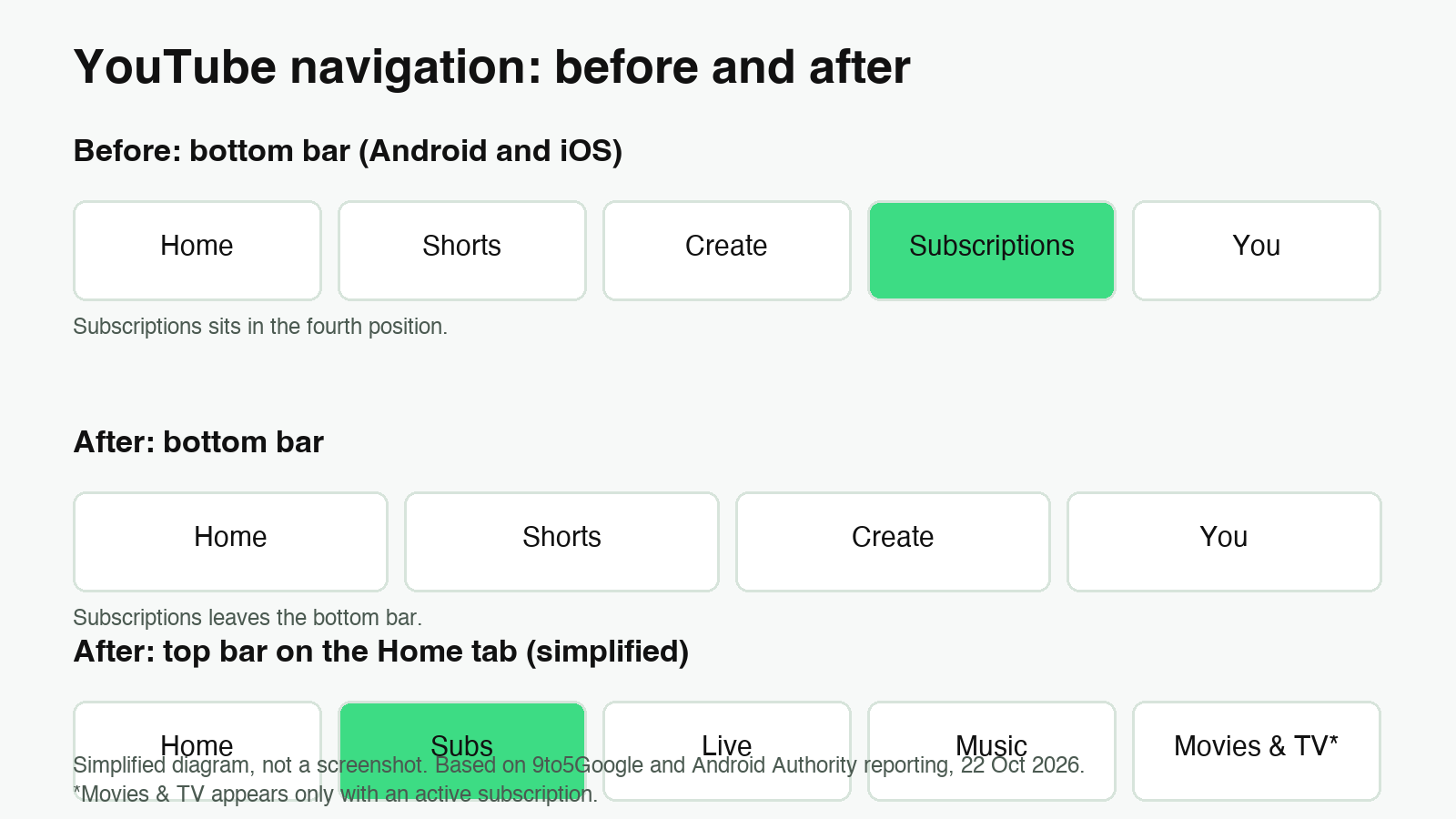
YouTube is moving Subscriptions out of the bottom bar on Android and iOS. The tab now sits in the top bar of the Home tab, labeled “Subs”, and the bottom bar keeps Home, Shorts, Create and You. If you go looking for your subscriptions in the old place, that is why they seem to have disappeared.
This is more than a label change. The move comes together with custom feeds, a feature that lets you describe the videos you want in plain language. Below is what changed, where to find things now, and the limits that matter, based on YouTube’s own Help pages and reporting from 9to5Google and Android Authority.
What changed in the app
In the bottom bar, Subscriptions used to occupy the fourth slot. Now the Home tab’s top bar shows “Subs” right after Home, with a red underline. Next to it, YouTube adds dedicated feeds for Live and Music, plus Movies & TV, which only appears if you have an active subscription to the relevant service. 9to5Google also reports that the change removes the navigation drawer.
Where to find your subscriptions
- Open YouTube on your Android phone and stay on the Home tab.
- Look at the top bar, where “Subs” sits next to Home.
- Tap “Subs” to open the subscriptions feed.
None of the sources we checked mention a setting that brings the old bottom tab back, so there is no hidden option worth hunting for. If the top bar still looks the old way on your account, see the rollout note below.
How custom feeds work
Custom feeds replace the old topic chips on mobile. You describe what you want, and YouTube keeps a feed for it at the top of Home. YouTube’s own example is “Help me unwind after work with guided meditations under 10 minutes”. On a phone, tap the plus button at the top of the Home feeds and describe the topic, channel, content type or mood you are after, as Android Authority explains. The Help page for the desktop version shows the same idea with a prompt box.
Four rules matter if you use the feature seriously:
- Limits: free accounts can keep up to 3 active custom feeds, and YouTube Premium members can keep up to 8.
- Expiry: a prompt that goes unused for 30 days expires, and its feed disappears with it. You can then write a new prompt.
- Editing: you can change a feed at any time by typing a new prompt in the box at the top of that feed.
- Requirements: you must be signed in, have watch and search history turned on, and use English as the YouTube device language. Custom feeds are not available on tablets yet.
What your watch history will record
According to YouTube’s Help page, videos you watch from a custom feed are added to your standard watch history, and they can influence your main Home recommendations. The feeds themselves are private to your account. If you explore a topic you do not want shaping your recommendations, remove that feed once you are done, and remember that anything you watch inside it still counts.
If you still don’t see the change
The reporting we checked does not give a rollout date for the Subs move. Custom feeds have the clearest rules so far: they are currently available in English in the United States, and YouTube says availability may change. Outside that setup, the honest answer is that the change may not have reached your account yet, and nothing we found suggests a way to force it.
What actually changes for you
For most people this is a navigation habit, not a loss of features. Subscriptions is still one tap away, just on the Home screen instead of the bottom bar. The more meaningful change is custom feeds, which turn a fixed set of topic chips into saved prompts that generate fresh recommendations. That is useful, but it comes with a cost: a three-feed limit on free accounts, a 30-day expiry, and a watch history that records whatever you explore. Plan around those limits, keep the feeds you actually open, and delete the rest.
In short
- Subscriptions left the bottom bar and now appears as “Subs” in the Home top bar.
- Custom feeds replace the old topic chips on mobile.
- Free accounts can keep 3 active custom feeds, Premium accounts 8.
- Custom feeds currently need English, watch and search history on, and a US rollout.
- A custom feed prompt expires after 30 days of inactivity.