On this page
Canada has a clock problem that most phones will not solve on their own. British Columbia made its last clock change in March, when most of the province moved to permanent daylight time. Manitoba has now confirmed that it will stay on daylight time too, so its clocks will not go back on November 1. Google has published guidance for Canadian Android users whose phones show the wrong time because of these new rules, and the fix it suggests is short. The useful moment to check is before the first Sunday in November, not after the phone has already shown an hour that is wrong.
Why November 1 is the trap
Most of North America normally moves its clocks back an hour on the first Sunday of November. On November 1, 2026, that is exactly what an out-of-date phone may try to do. A device with old time zone rules can keep applying the winter schedule even where the local rules say the clocks stay put. In Manitoba and in most of British Columbia, the result would be a clock that is one hour off for the rest of the winter.
That is why the test is not “does the clock look right today?” The real question is whether the phone has current time zone rules and applies them correctly for the zone you have selected.
Step 1: Install pending updates and restart
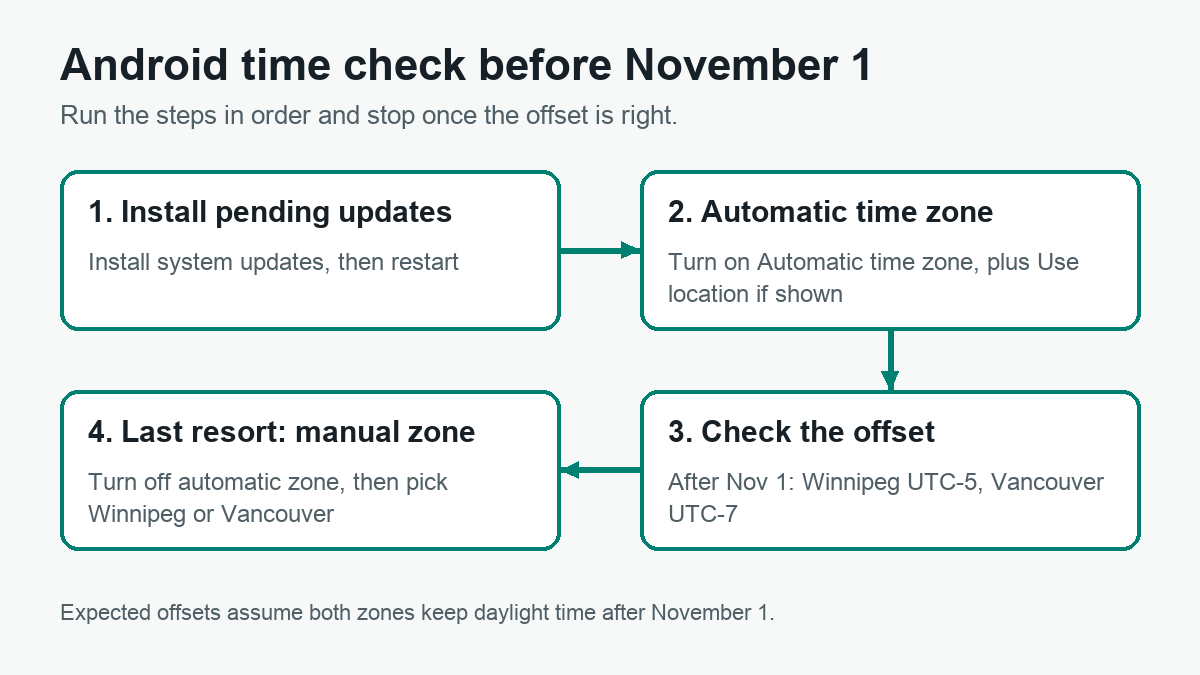
Google’s first recommendation is to install any pending updates from your phone maker and from Google, then restart the device. Many people skip this step because the clock already shows a time. It is still the most important one, because time zone rules are data that the system can refresh. A phone that has been waiting on an update for weeks is the first suspect. Menu names change between Pixel, Samsung and other brands, so look for the system update screen in Settings rather than following a fixed path.
Step 2: Turn on automatic time zone
Open Settings, search for “Date & time” and check these options:
- Automatic date & time
- Automatic time zone
- Use location for time zone, if your device shows it
Google’s help page notes that only some devices can set the time zone automatically, so if you cannot find these options, your model may not support them. Location-based detection is the convenient choice because the phone picks the zone from where it is. It also means the zone depends on location data, which is a trade-off worth knowing before you turn it on.
Step 3: Check the offset after November 1
Do not rely only on the city name. Compare the phone with a reliable clock set to Winnipeg or Vancouver, or check the UTC offset in the time zone settings if your build shows it. The expected result after November 1 is simple: Winnipeg should stay at UTC-5 and Vancouver at UTC-7. If the phone drops to UTC-6 in Winnipeg or to UTC-8 in Vancouver, it has applied the old winter rule.
Step 4: Set the zone manually as a last resort
If the phone still shows the wrong zone after the update and restart, turn off Automatic time zone, tap Time zone and select Winnipeg or Vancouver. This fixes a wrong zone choice. It does not fix a phone whose time zone rules are outdated, because the device still uses its own rules to calculate the offset. If the offset is still wrong after an update and a restart, the problem sits in the system. Report it to Google’s Android Help community thread and to your phone maker, with the model, the Android build and the zone you selected.
What we could and could not verify
This guide relies on Google’s public community guidance as reported by The Verge, on Google’s Android help page about time and time zone settings, and on CBC’s reporting about Manitoba and British Columbia. We have not tested these steps on a phone in Canada. Treat them as a checklist to run before November 1, not as a lab result.
In brief
- Manitoba’s clocks will not go back to standard time on November 1, and British Columbia has been on permanent daylight time since March.
- Follow Google’s order: install pending updates, restart, turn on automatic time zone with location if shown, and only then set the zone manually.
- After November 1, Winnipeg should stay at UTC-5 and Vancouver at UTC-7. A one-hour error after that date usually points to outdated rules, not to a cosmetic glitch.
Related AndroidLab coverage, in Italian: how Wear OS 6.1 handles automatic time zones.
Sources
- Google Android Help Community: [Canadian users] Impact of the recent time zone changes in Canada
- Google Android Help: Set time, date and time zone
- The Verge: Google tells Android users to update as parts of Canada adopt permanent daylight time
- CBC: Manitoba adopts permanent daylight time
- CBC: B.C. is moving to permanent daylight time