On this page
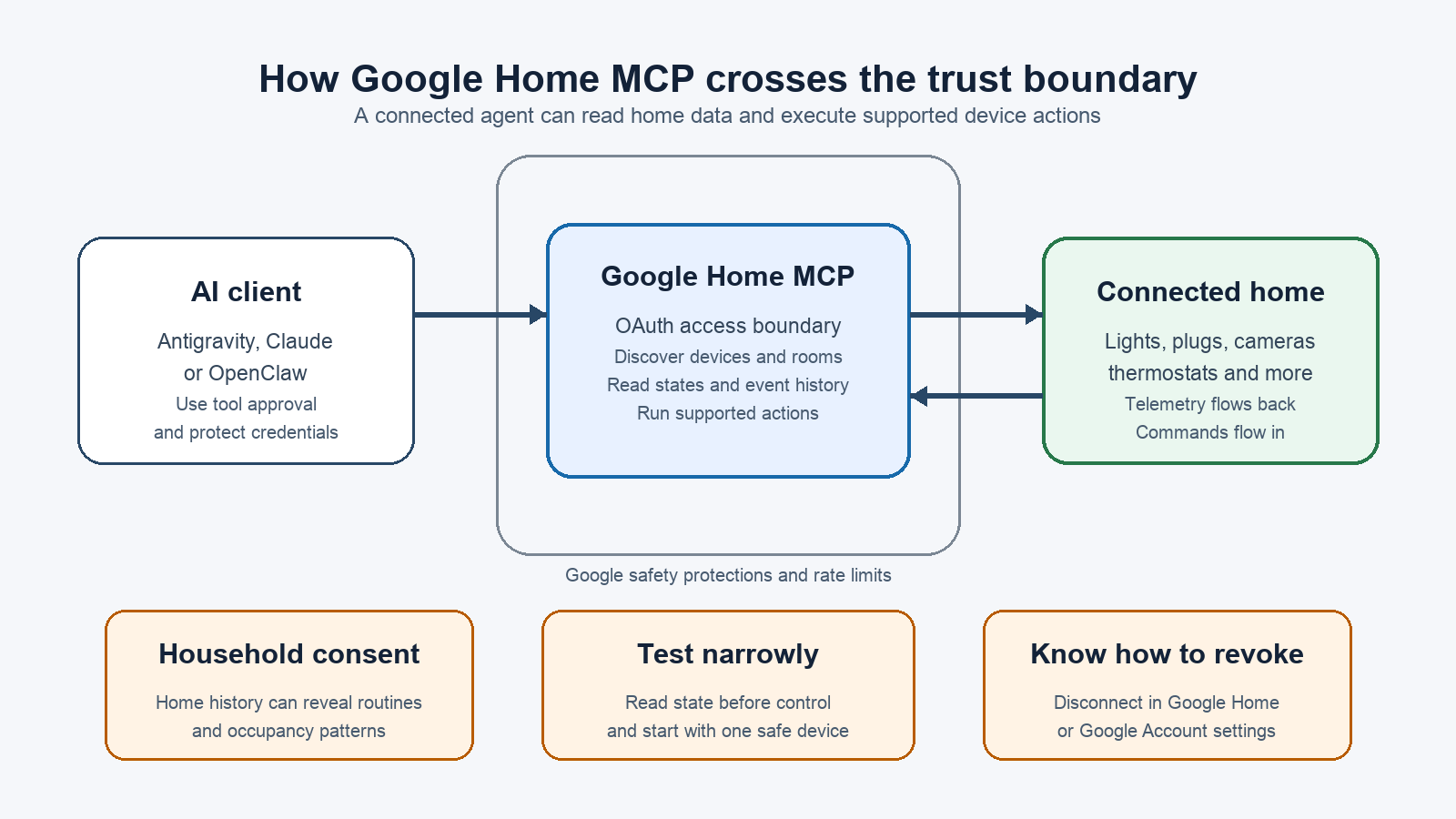
Google Home has crossed an important line: an AI agent can now inspect a home, read live device states, issue commands and review past events through the new Google Home MCP server. This is not simply a smarter voice assistant. It is a general-purpose connection between home telemetry and MCP-compatible clients such as Antigravity, Claude Cowork and OpenClaw.
The feature entered early access in September 2026. Google’s documentation is unusually direct about the risk: an agent acting on your behalf may produce unexpected or unwanted behavior. The useful question is therefore not just whether Home MCP works, but whether the account, permissions and home behind it are ready for an agent that can act.
What Google Home MCP can access
Google’s official Home MCP documentation lists five capability groups. A connected client can discover homes, list devices and rooms, read connectivity and trait states, execute supported device actions, and query historical state changes or event logs.
That makes practical requests possible. An agent could count the lights in a property, check which devices are offline, turn off outside lights, or summarize what changed while the user was away. It can also use the device schema returned by Google instead of guessing which commands a particular product accepts.
There are limits. Google says the service applies rate controls and safety protections, including a prohibition on sensitive actions such as unlocking doors. Creating and managing Google Home automations is not supported at launch. Some exposed traits are still experimental, and Google lists latency as a known issue. Those constraints reduce risk, but they do not make every allowed action harmless.
Who can use it now
This is early access, not a switch that appears for every Google Home user. The official prerequisites include an active Google Home with connected devices, a Google Home Premium Advanced subscription, a Google Cloud project and an MCP-compatible client. TechCrunch reports that the initial rollout is for Advanced subscribers in the United States and may take several weeks to reach eligible accounts.
The normal Google Home app on Google Play remains part of the setup and revocation path, but installing the app is not enough. Google also requires the Home API to be enabled in a Cloud project, an OAuth consent screen and client credentials for the chosen AI client.
Seven checks before connecting an AI agent
- Confirm eligibility before creating credentials. Check the subscription, country, rollout status and Home structure first. If Home MCP is not available to the account, repeatedly rebuilding a Cloud project will not summon it through sheer administrative optimism.
- Use a separate Cloud project. Keep the Home MCP configuration away from unrelated production APIs and credentials. A dedicated project makes consent, logs, credential rotation and eventual deletion easier to understand.
- Treat the client secret as a secret. Store it only in the configuration mechanism documented by the selected client. Do not paste it into public chats, issue trackers or screenshots. If it has been exposed, rotate it before continuing.
- Read the OAuth screen carefully. Select the intended home structure and verify which Google account grants access. Familiar Faces data requires separate consent, a compatible Nest camera or doorbell, and an eligible subscription. Do not treat that additional consent as a routine Next button.
- Start with a test home when possible. Google explicitly suggests creating an additional home with development devices instead of connecting a real shared household. This separates experiments from locks, cameras, thermostats and daily routines used by other people.
- Require action approval in the client. If the MCP client can ask before running tools, keep confirmation enabled at least during testing. Test discovery and read-only state requests before device-control commands, then try one low-impact device at a time.
- Prepare the exit path. Google says Home MCP access can be revoked from the Google Home app or the Google Account connections page. Verify that route before the first live command, not after an agent begins operating the wrong room.
Privacy risks are not limited to camera footage
Home data becomes sensitive long before an image is involved. Device states and event history can reveal when a household wakes, leaves, returns, changes temperature, opens a door or turns off lights. A harmless-looking timeline can become an occupancy profile when an agent is allowed to correlate enough events.
Google warns users to inform other household members because the connected agent can control devices and access home data. That is a minimum, not etiquette. Consent from the account manager does not erase the reasonable privacy expectations of everyone else living in the same space.
Before connecting a shared home, decide which questions the agent should answer, which devices it may control, whether tool calls require confirmation and how long the client retains outputs. Google’s platform policies restrict developer handling of Home data, but the selected agent still has its own account, logging and retention model. Review both sides of the connection.
A safe first test
Begin with discovery: ask the agent to list the home, rooms and device names. Compare that inventory with the Google Home app. Next, request the live state of one light or smart plug without changing it. Only then approve a reversible command, such as turning that light off and back on while someone is present.
Check the result in the Home app and review any activity available in the client. Do not begin with broad prompts such as “secure the house” or “make everything comfortable.” Those phrases hide several decisions about locks, cameras, alarms, thermostats and occupancy. An agent cannot honor a policy that the operator never defined.
If the goal is conventional routines rather than agent-driven control, Home MCP may be the wrong tool today. Google says automation creation and management are coming later. For the current Google Home routine model, our guide to suggested Google Home automations covers the checks to make before allowing routines to run.
What actually changes
Google Home previously exposed controls through Google’s apps, fixed Assistant intents and approved integrations. MCP adds a standard interface that lets more capable, general-purpose agents combine discovery, telemetry, history and actions in one conversation. That is genuinely useful for diagnostics, dashboards and custom workflows.
It also increases the blast radius of a vague instruction or a badly configured client. Google’s safety blocks matter, but the most effective guardrail is still a narrow setup: dedicated project, explicit consent, test devices, confirmed actions and a known revocation path. The smart home has gained a powerful operator. It should not gain an invisible one.
In brief
- Google Home MCP lets compatible AI agents discover devices, read states, run supported actions and query history.
- Early access requires Google Home Premium Advanced, a Cloud project, OAuth credentials and an eligible MCP client.
- Google blocks sensitive actions such as unlocking doors, but warns that agents can still behave unexpectedly.
- Use a test home or low-impact device first, keep tool approval enabled and inform everyone in a shared household.
- Revoke access from Google Home or the Google Account connections page if the client is no longer trusted.
Sources
- Google Home Community: Introducing Home MCP, published September 16, 2026
- Google Home Developers: Home MCP user guide, updated September 15, 2026
- Google Home Developer Platform policies, checked September 16, 2026
- TechCrunch: AI agents can control Google Home devices, published September 16, 2026
- The Verge: Google Home opens to third-party AI agents, published September 16, 2026