Google is rolling out a new system app called Signature on some Android phones, and the important part is not the slightly bureaucratic name. According to 9to5Google, the app is appearing on Pixel devices and some other Android phones after the June 2026 Google Play system update, while SamMobile reports the same kind of rollout on Galaxy phones. Android Authority spotted the component earlier and describes a simple but potentially useful idea: create, store and reuse a digital signature inside Android.
The AndroidLab angle is practical: before treating it as “the Android way to sign documents,” it should be handled as a rolling system feature, not a normal app you can safely hunt down on the Play Store. On paper it could reduce the usual PDF ritual: open the document, scribble a signature badly, paste an image even worse, save the file as final-real-2.pdf. In practice, you need to check compatibility, visibility and whether your document apps actually support it.
Related: AndroidLab has already covered why Google Play system updates are now a second delivery channel for Android features in our guide to Android system-level checks before switching phones. Signature appears to live in that same zone: not a full firmware update, not a manual app download, but a component distributed through Google’s system stack.
What Google Signature is
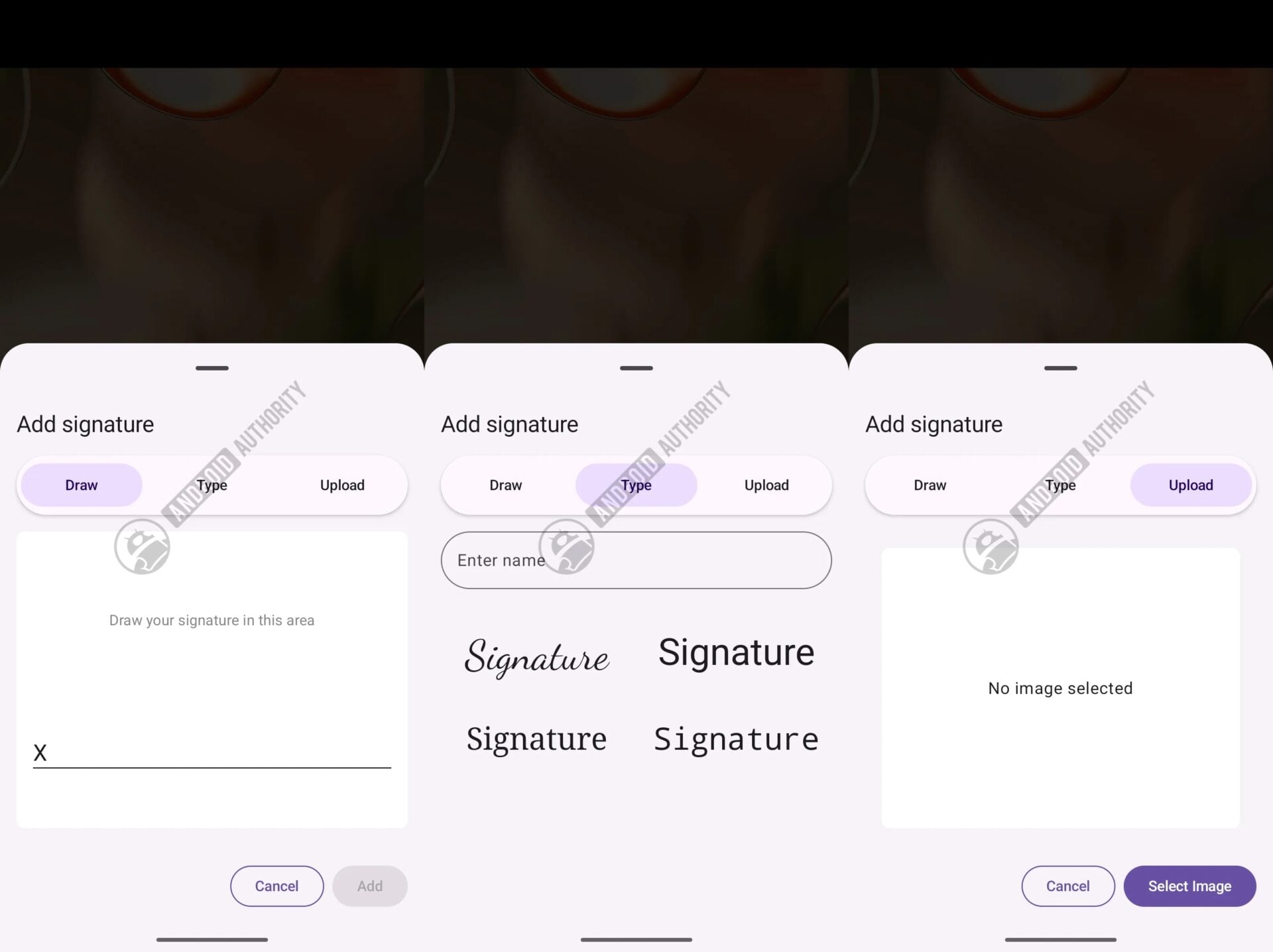
Android Authority describes Signature as a vault for digital signatures. Users can create a signature by typing it, drawing it or importing it from an image, then keep it available so compatible apps can request it when a document needs signing. SamMobile adds a useful Galaxy angle: this could make document signing easier on phones and tablets that do not include an S Pen.
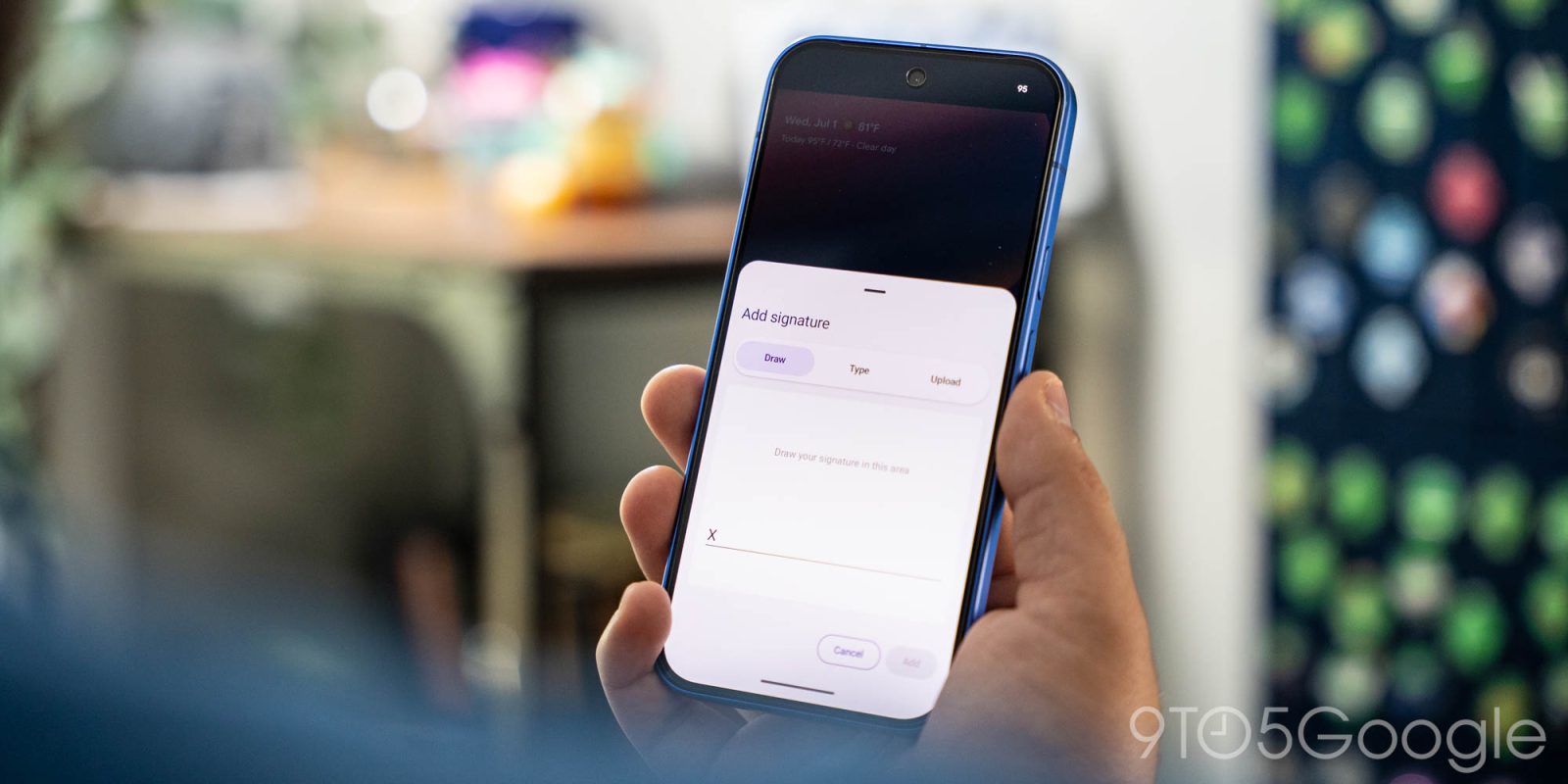
9to5Google saw the app on a Pixel 10 and on a Galaxy Z Fold 7, but not on every tested device. That is the first practical limit: having a recent Android phone may not be enough. Availability appears to depend on Google’s rollout, the installed Play system update and possibly model, software channel and region. In other words, classic Android distribution: it works, but not before sending you through a few settings screens for sport.
Requirements and compatibility checks
The available evidence points to a broad minimum requirement: Android Authority and 9to5Google mention support for Android 12 or newer. That does not mean every Android 12 phone will get the app immediately. It only suggests the component is not limited to Android 17 or the latest Pixels.
- Check your Android version in Settings > About phone.
- Open Settings > Security and privacy > System and updates, or the equivalent path on your device.
- Check the Google Play system update date: the sources point to June 2026.
- Update Google Play Services and restart the phone if the update was just installed.
- Avoid APK mirrors: for a feature that stores personal signatures, the sensible route is the system rollout.
How to check whether it is already available
This is where caution matters. 9to5Google notes that the app does not yet have a normal Play Store listing you can use and that, in some cases, the only visible route is manually launching its activity components. For most users, the check should stay clean: no random sideloads and no ADB unless you actually need it.
- Search for “Signature” in your launcher and app settings.
- Check the full app list, enabling system apps if your device allows it.
- If you use an advanced launcher, look for an activity tied to
com.google.android.signature. - Open a PDF or a trusted document signing app and see whether a signature picker appears.
- If nothing appears, wait for the rollout instead of forcing an external install.
What it can do and what remains unclear
The functions seen so far are three: typed signature, touchscreen-drawn signature and signature captured from an image or camera. When a compatible app requests a signature, Signature should open in a partial-screen window and let you choose the right one. The model makes sense: the signature stays in a central component, while apps request it when needed.
Two major questions remain. The first is app integration: it is not yet clear which apps will use the system immediately, or whether Google will tie it into Drive, Docs, PDF viewers, web forms or external signing services. The second is trust. A convenient digital signature is not automatically a strong legal signature. For contracts, work documents or regulated workflows, distinguish clearly between a graphical signature, an electronic signature and a qualified signature. Android can simplify input; it cannot magically turn every scribble into verified identity.
Common issues and quick fixes
- The app does not appear: check the Play system update, reboot and wait for the server-side rollout.
- The Play Store will not install it: expected, the sources describe system-update delivery.
- Your phone runs Android 12+ but still lacks it: minimum support and actual rollout are different things.
- The signature does not appear in PDFs: your PDF app may not support the integration yet.
- You handle sensitive documents: always check which app receives the signature and where the signed file is stored.
What really changes
If Google turns this into a stable Android component, Signature could become small but useful infrastructure for a very ordinary task: signing documents without recreating the same signature every time. It is not spectacular, but it is practical, especially on phones without a stylus and on inexpensive tablets. The limit is just as concrete: until Google explains integrations, privacy and availability, treat it as a feature to check, not a finished workflow.
In brief
- Google Signature is a new Android system app for creating and storing digital signatures.
- The sources tie it to the June 2026 Google Play system update.
- Reported compatibility starts at Android 12, but rollout is not universal.
- Signatures can be typed, drawn or captured from an image/camera.
- There is no normal Play Store channel to force installation.
- For important documents, always distinguish a graphical signature from a legally verified signature.
Sources
- SamMobile — Google’s upcoming app could make signing documents easier on Galaxy phones (July 1, 2026)
- 9to5Google — Google rolling out new “Signatures” app to Pixel and other Android phones (July 1, 2026)
- Android Authority — First look: Google’s new Signature app makes it easy to use your signature in Android apps (June 29, 2026)