On this page
Running modern Android on an ordinary x86_64 laptop has mostly been a museum exhibit since Android-x86 slowed down and BlissOS struggled to keep pace with recent AOSP releases. That is why CapivaOS, an unofficial community port of LineageOS 24.0 (Android 17) for generic x86_64 PCs by developer Mateus Seiboth, caught the attention of modding and Linux circles on November 27, 2026. Rather than requiring a dedicated Googlebook or wiping a primary drive, it boots live from a USB stick or installs into a single folder on an existing partition through GRUB.
The project lives publicly in the android_device_pc_x86_64 GitHub repository, with bootable live ISOs hosted on SourceForge. It builds on official LineageOS 24.0, which itself rebased onto Android 17 ahead of LineageOS’s tenth anniversary in December 2026. Before grabbing a flash drive, though, it helps to separate what already works cleanly in virtualization from what remains untested on real PC hardware.
How the boot chain and folder install work
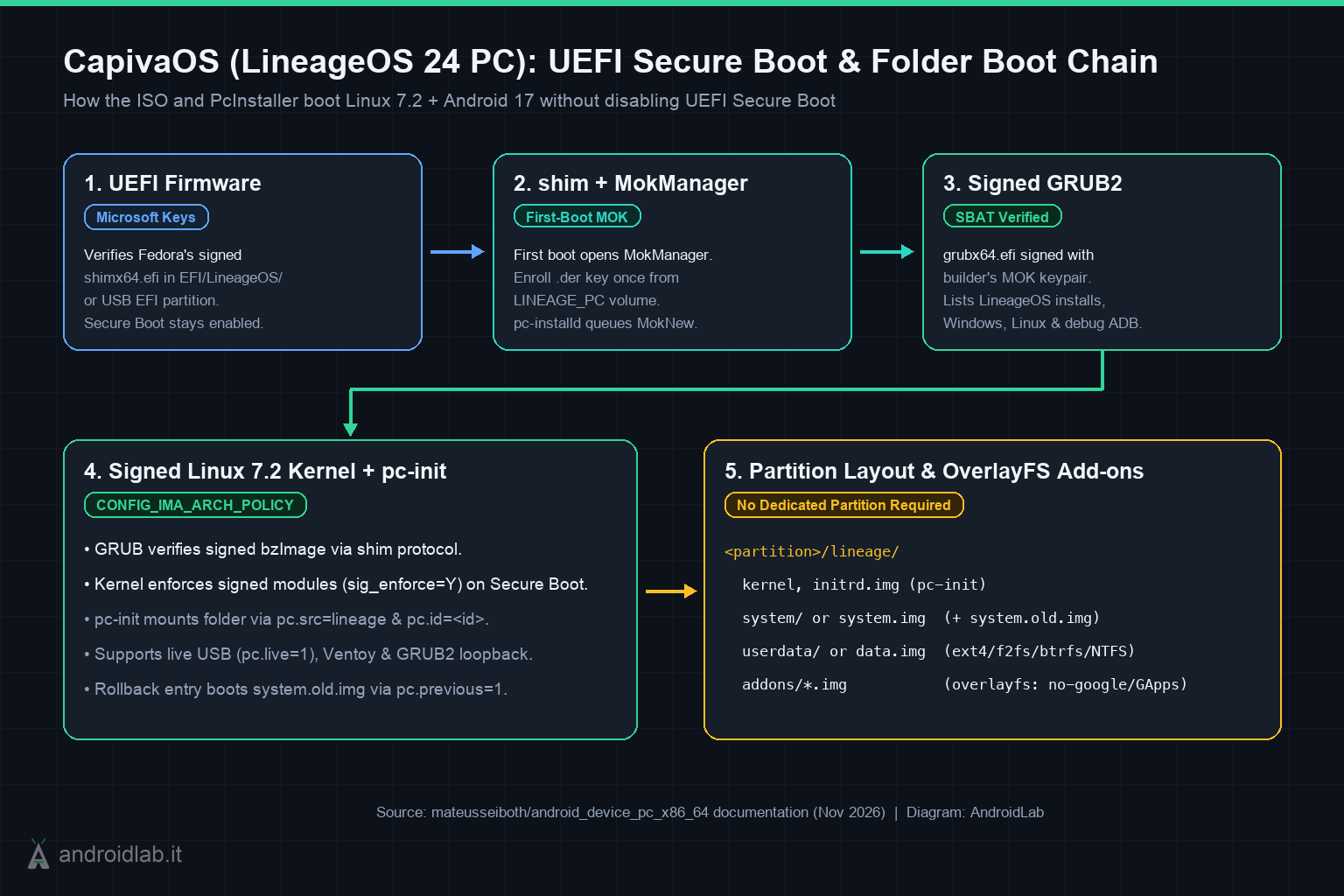
Following the classic Android-x86 and BlissOS model, CapivaOS avoids forcing a dedicated Android partition layout. On a Linux filesystem such as ext4, f2fs, or btrfs, the system can live extracted inside a lineage/ folder alongside kernel, initrd.img, and userdata/. On NTFS or exFAT partitions, it falls back to system.img and data.img disk images. Updates keep a system.old.img fallback so you can boot the previous release with the pc.previous=1 kernel parameter if a build breaks.
The most engineered part of the tree is its UEFI Secure Boot chain. Instead of telling users to disable Secure Boot in firmware, the ISO and the bundled PcInstaller app use Fedora’s Microsoft-signed shimx64.efi together with a Machine Owner Key (MOK):
- UEFI firmware verifies Fedora’s signed
shimx64.efiusing Microsoft’s keys. shimx64.efihands off to a signedgrubx64.efi(carrying SBAT metadata) and invokes MokManager on first boot so you can enrollENROLL_THIS_KEY_IN_MOKMANAGER.derfrom theLINEAGE_PCvolume.- Once enrolled, GRUB verifies the signed Linux 7.2 kernel, and the kernel enforces module signatures via
CONFIG_IMA_ARCH_POLICYwhile Secure Boot is active.
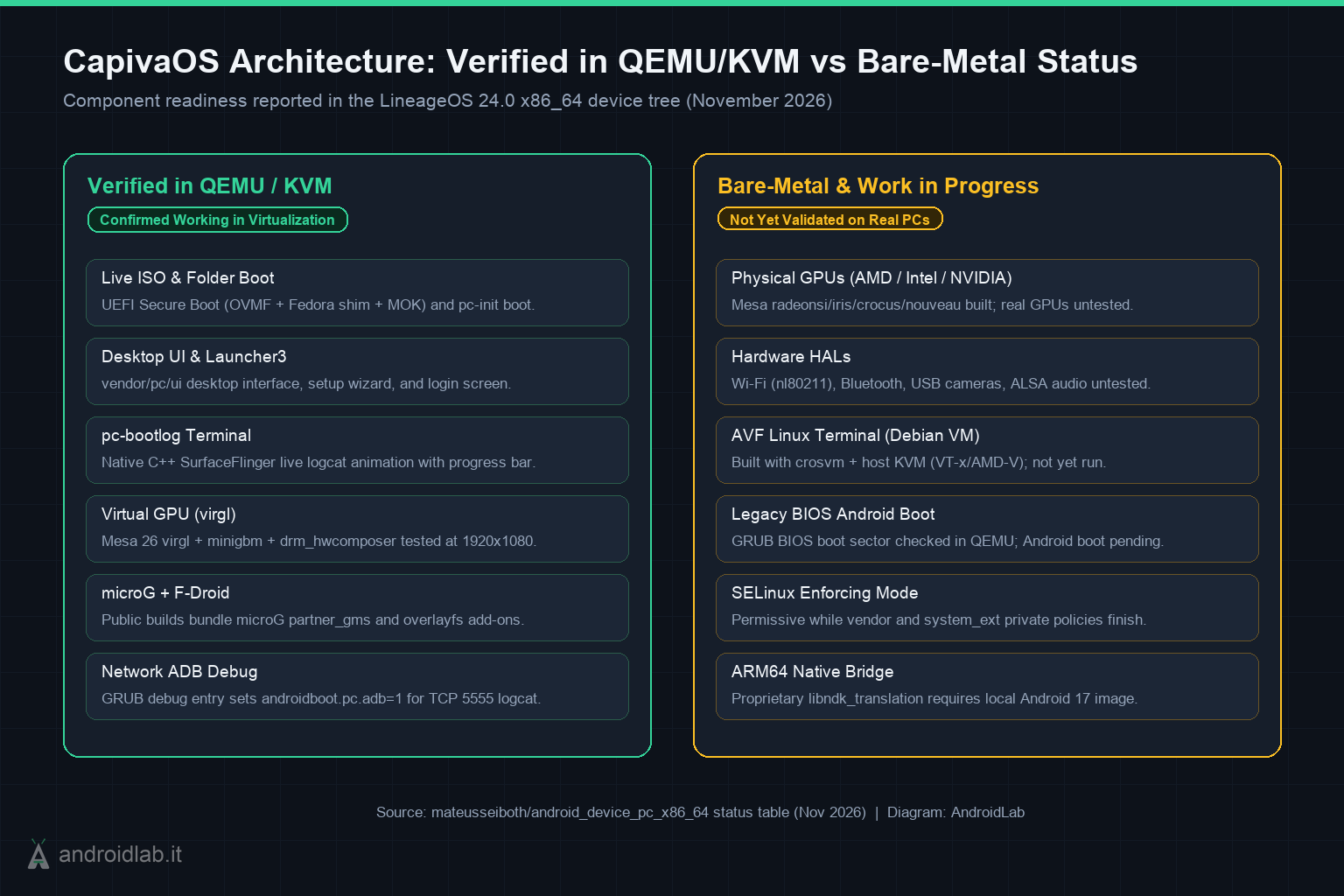
Multiboot sticks are supported as well: the custom pc-init initrd locates the LINEAGE_PC ISO under Ventoy’s normal mode or accepts iso-scan/filename through GRUB2 loopback loaders. Legacy BIOS disks are handled via GRUB’s BIOS boot sector, though the developer notes that while GRUB’s BIOS path was checked in QEMU, full Android boot on legacy BIOS has not yet been verified end to end.
Kernel 7.2, Mesa graphics, and the real GPU bottleneck
Under the hood, CapivaOS compiles an upstream Linux 7.2 kernel derived from Fedora’s configuration plus Android’s required fragments, built with AOSP’s clang toolchain. Graphics rely on an open-source Mesa 26 stack (radeonsi, iris, crocus, r600, nouveau, virgl, and softpipe, plus RADV, ANV, and venus for Vulkan) wired through minigbm and drm_hwcomposer. A dedicated patch even backports a Mesa 26.1.2 BLORP fix for garbled text on Sandy Bridge and older Intel GPUs.
In practice, graphics and peripheral HALs are where the project’s early status shows most clearly. According to the repository’s own status table, the desktop UI, live boot log (pc-bootlog, a native C++ logcat terminal drawn directly onto SurfaceFlinger), and virgl acceleration have been verified in QEMU/KVM. Real bare-metal GPUs, as well as real-hardware Wi-Fi (nl80211), Bluetooth, USB cameras, and AIDL audio over ALSA, are explicitly listed as not yet validated on physical machines. Newer AMD and Intel integrated GPUs stand the best chance today; NVIDIA cards and legacy Intel graphics remain hit-or-miss.
ARM app translation, microG, and the KVM Linux Terminal
On the software side, CapivaOS targets a minimum of 4 GB of RAM (with 8 GB recommended) and ships a desktop-oriented interface alongside basic utilities such as a file manager, text editor, and system resource viewer. Because Android 17 is 64-bit only, ARM-only Android apps rely on Google’s proprietary libndk_translation native bridge (arm64) invoked through binfmt_misc when built locally from an Android 17 x86_64 emulator image.
Public builds do not bundle proprietary Google Mobile Services. Instead, they include microG (GmsCore, GsfProxy, FakeStore) and F-Droid, using LineageOS 24’s restricted signature spoofing for microG. If you want a stripped build without microG or a personal Google Apps overlay, the tree includes an addons/make_addon.py tool that generates ext4 overlayfs images applied at boot by pc-init. That modular approach matters even more as Google tightens restrictions around app installation outside Play, a shift we analyzed in our guide to Android sideloading changes for 2027.
CapivaOS also wires up Android 17’s Linux development environment (the Terminal app powered by the Android Virtualization Framework and crosvm). Because standard PCs lack Android’s protected pKVM hypervisor, the port runs non-protected Debian VMs directly on the Linux kernel’s standard Intel VT-x or AMD-V KVM. To enable it in Settings under Developer options, the host needs hardware virtualization enabled in BIOS/UEFI, at least 4 GB of RAM, and 16 GB of free storage. As with bare-metal GPUs, the AVF Terminal is built into the image but has not yet been run on physical PC hardware.
What actually changes for PC and Android users
CapivaOS does not turn an old laptop into a polished Googlebook overnight. SELinux is still in permissive mode while vendor and system_ext policies are finished, bare-metal hardware drivers are largely unverified outside QEMU/KVM, and there is no official support from the LineageOS team. Anyone expecting plug-and-play Netflix, flawless sleep/resume, or out-of-the-box NVIDIA acceleration will hit walls immediately.
What changes is the technical baseline. For the first time in years, there is a clean, open-source Android 17 device tree for generic x86_64 PCs that takes Secure Boot, upstream Linux 7.2, Mesa 26, overlayfs add-ons, and KVM-backed Debian terminals seriously instead of relying on stale kernels and manual partition hacks. For developers, retro-laptop tinkerers, and anyone curious about desktop Android without buying new hardware, it is a solid experimental sandbox.
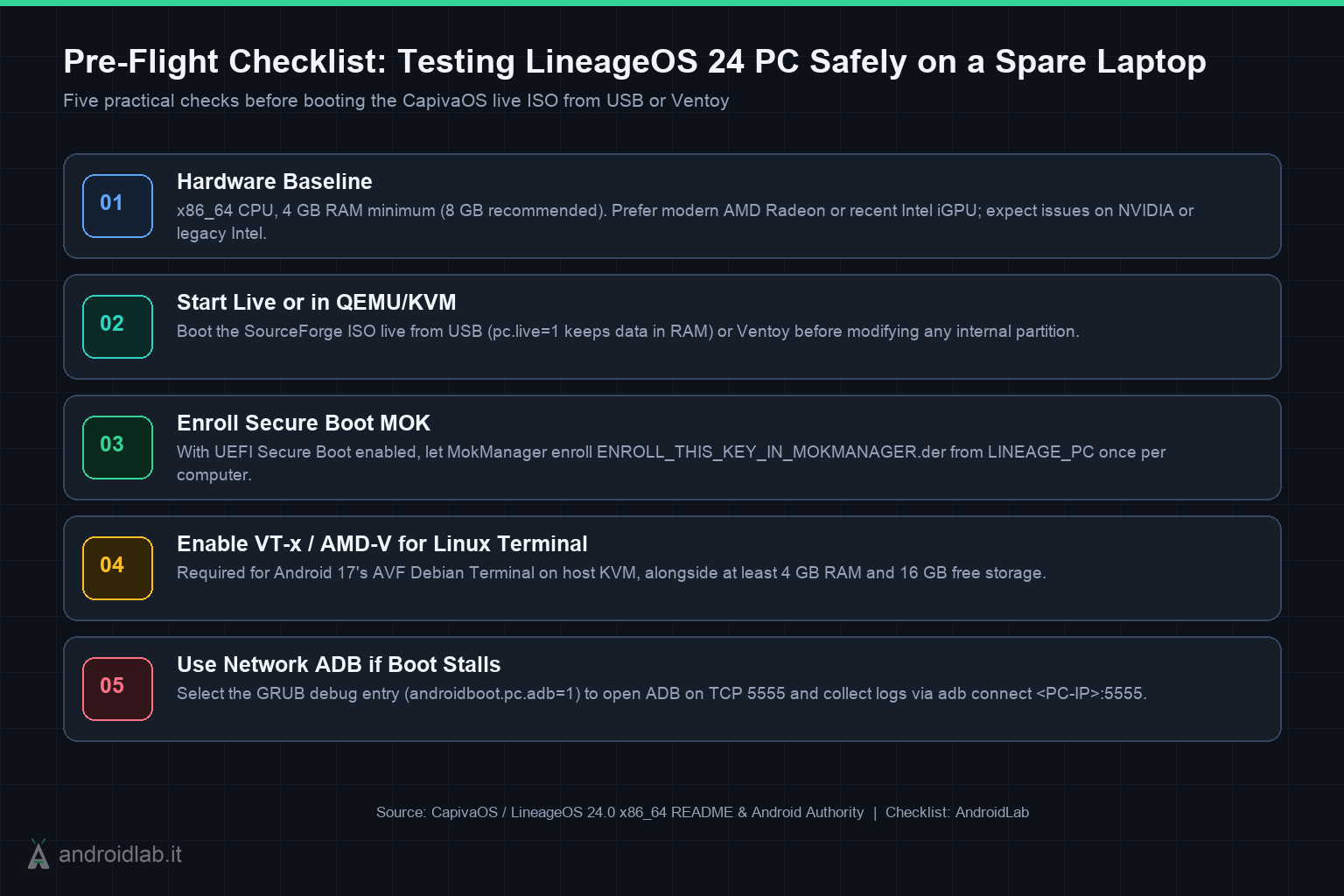
Pre-flight checklist before testing the live USB
If you want to try CapivaOS on a spare machine without risking your main OS, run through these checks first:
- Use a spare machine or QEMU/KVM first: treat the SourceForge ISO as an early developer preview, not a daily driver.
- Check your GPU: expect the smoothest results on modern AMD Radeon or recent Intel integrated graphics; keep expectations low on NVIDIA hardware.
- Prepare for Secure Boot MOK enrollment: if Secure Boot stays enabled, follow the on-screen MokManager prompt on first boot to enroll
ENROLL_THIS_KEY_IN_MOKMANAGER.derfrom the USB stick. - Enable VT-x or AMD-V in firmware: required if you plan to test Android 17’s KVM-based Debian Terminal app, alongside at least 4 GB RAM and 16 GB storage.
- Use network ADB for debugging: since modern laptops lack serial ports, selecting the GRUB debug entry adds
androidboot.pc.adb=1and opens ADB on TCP port 5555 for remoteadb logcatdiagnostics.
In brief
- CapivaOS is an unofficial LineageOS 24.0 (Android 17) port for x86_64 PCs by Mateus Seiboth, distributed via GitHub and SourceForge.
- It runs live from USB (including Ventoy) or installs into a folder on an existing partition via GRUB, with UEFI Secure Boot supported through Fedora’s shim and MOK enrollment.
- The build pairs Linux kernel 7.2 with Mesa 26, microG, F-Droid, overlayfs add-ons, arm64
libndk_translationsupport, and a KVM-backed AVF Linux Terminal. - Core desktop boot and Secure Boot are verified in QEMU/KVM, but bare-metal GPU, Wi-Fi, Bluetooth, audio HALs, and enforcing SELinux remain work in progress.