Telegram Amiga alpha 0.0.3 is now available as a new pre-release for AmigaOS 3.x, AmigaOS 4.x, MorphOS, AROS i386 and AROS x86_64. After 0.0.2 made the graphical client much more usable with scroll-back history, chat search, persistent unread badges and separate packages for each platform, this release focuses on something more conversational: making the chat window feel less like a protocol demo and more like an actual messaging client.
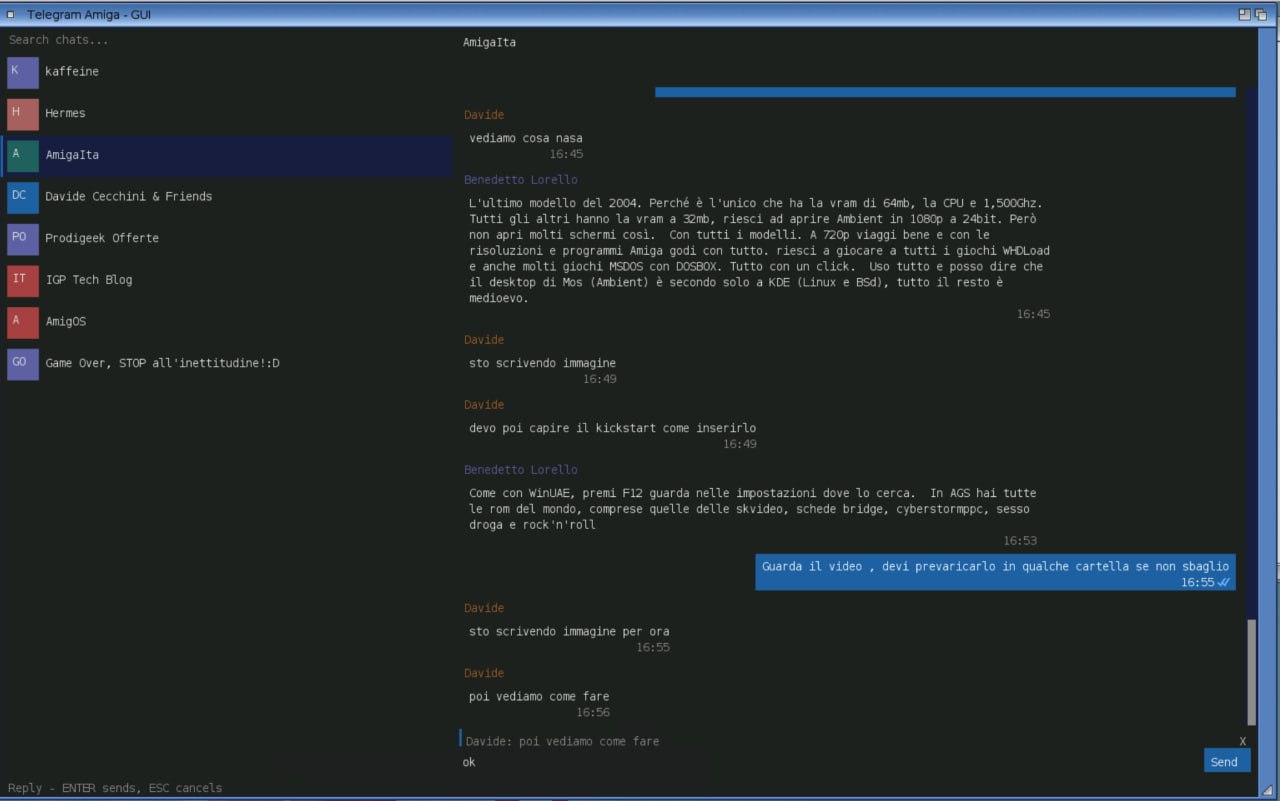
The main addition is native replies. In TelegramGUI you can select a message and send the next text as a real Telegram reply, not just as a local quote. The release also adds drawn delivery checkmarks, flicker-free painting through double buffering, a button to return to the newest message and clearer human-facing packages, now with a version-specific README.txt inside each archive.
What changes in alpha 0.0.3
Telegram Amiga remains a from-scratch MTProto client for Amiga-family systems. It is not a web wrapper, it does not use the Bot API as a shortcut for user messaging, and its GUI is not built on a heavy external toolkit. TelegramGUI uses Intuition/GadTools and is drawn directly by the program, while TelegramTUI keeps the text-mode path available for simpler machines and keyboard-first setups.
Alpha 0.0.3 builds on that architecture and improves the everyday flow. In the GUI, clicking a message bubble, or using the right-click context menu, prepares a reply target. The composer shows the referenced message, and the send path carries reply_to_msg_id into the MTProto request, so Telegram receives it as a real reply.
That matters more than it may sound. In modern chats, especially in groups, replying to a precise message is basic hygiene: without it, conversations quickly become textual archaeology. Bringing that feature into a native Amiga-like GUI closes another gap between a technical demo and a client people can realistically test.
Real replies, not fake local quotes
Technically, the reply is not only simulated in the local renderer. The send code now uses messages.sendMessage with the inputReplyToMessage object from the current MTProto schema. For a simple reply, Telegram Amiga serializes the original message ID and avoids newer fields that are not needed for this use case, such as advanced quotes, monoforum data or todo-related fields.
The GUI handles the user-facing part too. When a message is selected, the composer shows a small context row with sender and snippet, plus a cancel area. After sending, or with ESC, the target is cleared. The optimistic local echo also shows the quoted line immediately, so the user can see what they have just replied to without waiting for a full network round-trip.
It is a compact feature only from the outside. Under the surface it touches hit-testing for rendered rows, composer state, MTProto builder arguments, local optimistic messages, byte-level self-tests and edge cases such as system lines or local messages that have not yet been acknowledged by the server.
Drawn checkmarks and faster read state
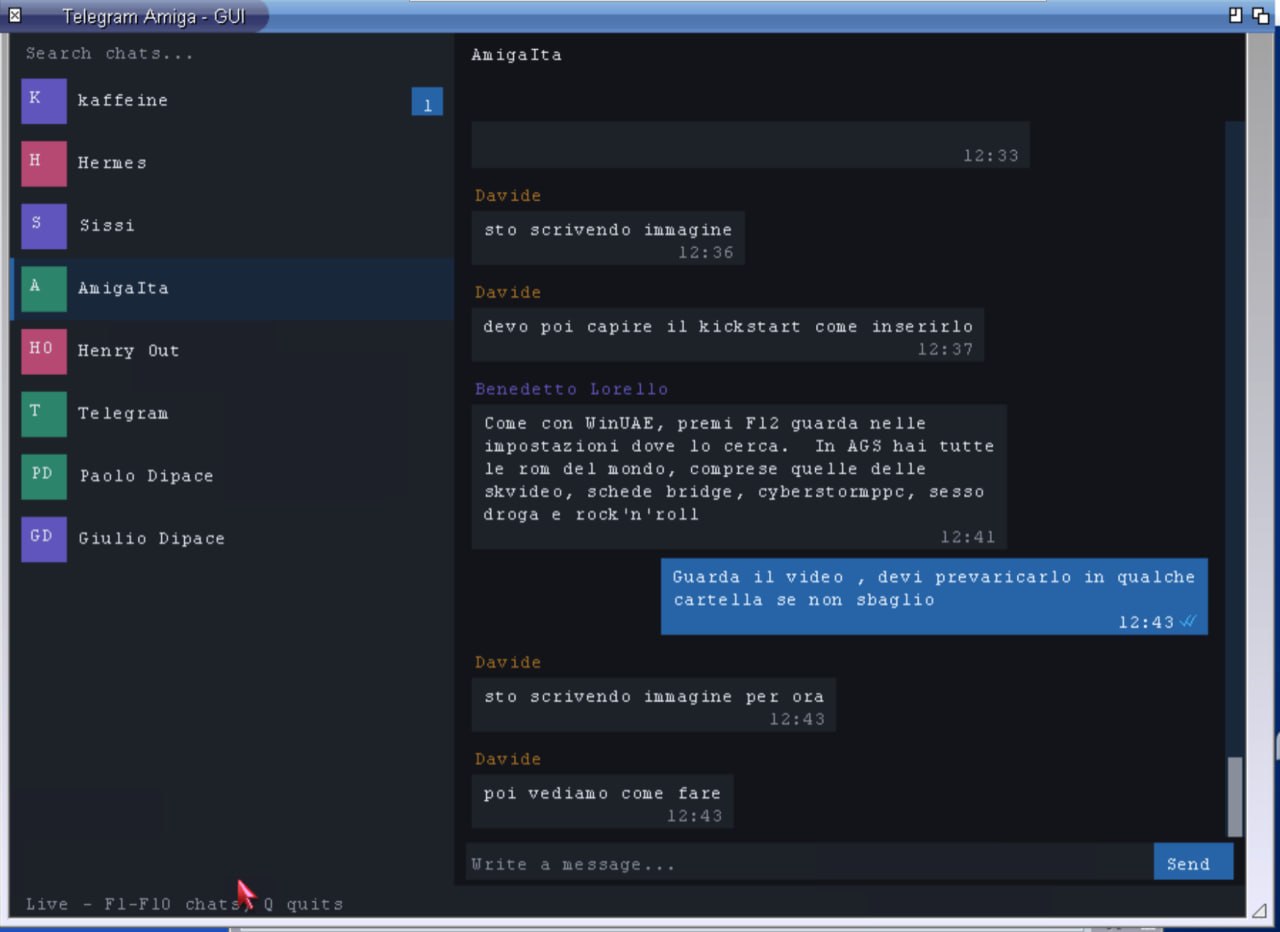
The second visible change is read receipts. In 0.0.2 the GUI used textual markers, which were practical but not very natural. Alpha 0.0.3 replaces them with real checkmarks drawn by the renderer: one check means the message was sent to the Telegram cloud, two blue checks mean it was read by the other side.
Drawing the checks directly is not just cosmetic. Bitmap fonts on Amiga-like systems do not guarantee a consistent Unicode check glyph, so the client builds the mark from small graphical segments, just as it already does for other UI elements. This gives the program control over size, alignment and colour without depending on the target system’s character set.
A follow-up fix then made the checks smaller and better aligned with the timestamp baseline, especially with larger AmigaOS 4 fonts. The read-state refresh is now adaptive: while one of your own messages is still waiting to become “read”, the client refreshes the peer read cursor every tick, roughly every three seconds; once everything is read, it relaxes again to avoid wasting round-trips on slower links.
Double buffering and jump-to-newest
The release also includes the immediately preceding rendering work. TelegramGUI now paints through an off-screen buffer and then copies the result into the window, reducing visible flicker during repaint, scrolling and updates. On systems where every repaint can become a small test of patience, this is not decoration; it is usability.
The conversation view also gains a button to jump back to the newest message. This is the familiar behaviour of modern chat clients: if you are reading older history and new messages arrive below, the client can signal that there is something newer and let you return quickly. In a GUI that already supports scrolling, history paging and progressive older-message loading, this is another practical piece of ergonomics.
More human packages
Packaging has improved as well. Each platform archive includes TelegramGUI, TelegramTUI, icons, the public telegram-api.txt file, Italian and English manuals and now a version-specific README.txt. It is a small addition, but it matters in the Amiga world: it turns “I downloaded an archive, now what?” into “copy the drawer to a writable volume and start TelegramGUI”.
The instructions also keep the important warnings visible. The drawer must be copied to a writable volume because the client stores its files next to the executables; telegram-auth.bin must never be shared because it contains the Telegram session; on slow 68k systems, Telegram’s PBKDF2-based 2FA step may be impractical before the login flow expires.
Available packages
Alpha 0.0.3 is published as five GitHub pre-releases, all dated June 27, 2026:
- AmigaOS 3.x alpha 0.0.3, native m68k build for 68020 or better;
- AmigaOS 4.x alpha 0.0.3, PowerPC build;
- MorphOS alpha 0.0.3, PowerPC build for MorphOS;
- AROS i386 ABIv0 alpha 0.0.3, the broadest AROS target for testers;
- AROS x86_64 alpha 0.0.3, for systems where SDK and kickstart come from the same line.
Project status
The word alpha still matters. Telegram Amiga is not a complete Telegram Desktop replacement: media upload and download, message editing and deletion, reactions, full contact management and long-session polish are still outside the current scope. The goal remains a dependable text client first.
Still, the trajectory is clear. Alpha 0.0.1 brought the public GUI, 0.0.2 consolidated chat lists, history, search, unread state and packages, and 0.0.3 starts tightening the micro-interactions that make a conversation readable: replies, checkmarks, jump-to-newest and less flicker. These are ordinary things on a smartphone; on AmigaOS, MorphOS and AROS they become measurable engineering progress.
Quick summary
- Telegram Amiga alpha 0.0.3 is available for AmigaOS 3.x, AmigaOS 4.x, MorphOS, AROS i386 and AROS x86_64.
- The GUI now supports native replies: click a bubble or use the right-click context menu.
- Replies are sent to Telegram as real
reply_to_msg_idmessages. - Read receipts are graphical checkmarks: one check for sent, two blue checks for read.
- The read-state refresh is faster while your own messages are waiting to be read.
- Rendering uses double buffering to reduce flicker, and the conversation view gets a jump-to-newest button.
- Packages now include IT/EN manuals and a version-specific
README.txt.