Telegram Amiga starts from a simple, slightly stubborn question: can you build a real, text-only Telegram client on Amiga-like systems in 2026, without turning it into a screenshot demo?
Latest update, September 13, 2026: the project has reached alpha release 0.0.93, covered in the release article. After link previews and video frames arrived in 0.0.92, this release adds an emoji picker, PNG photo sending, an alternate login route when the code does not arrive and live updates for previews that are already open. This diary remains the living index of the project: release articles cover the individual milestones, while this page keeps the broader technical direction in one place.
Chapter 12: emoji, PNG and a more honest login flow
Published on September 12, 2026, version 0.0.93 is the release in which Telegram Amiga starts paying more attention to what leaves the client. The emoji picker opens from the menu with Amiga+E or from the smiley button, shows 109 characters, keeps recent items and works with mouse, keyboard and ESC. The GUI draws emoji as 16-pixel pictures while the TUI keeps a text representation; sending still uses the actual Unicode character.
This is not only a visual choice. Emoji are enabled separately from inline photos, and the default takes hardware limits into account: native AGA/ECS/OCS systems and 68k machines below 68040 start with the feature disabled, while 68040+ and RTG can support it. It is a small but meaningful example of how a modern feature has to be mediated by concrete thresholds when the client runs across such different platforms.
PNG files can now follow the photo path, including the menu, drag-and-drop, TUI /photo and captions. The validator reads the real file structure through IEND, rejects truncated files and checks dimensions and proportions before upload. Server errors become readable explanations instead of generic failures.
Login handles the case where the code does not arrive through the expected route more clearly: after the wait, the screen normally offers SMS and the TUI accepts S. Diagnostics record the route and the wait, while new-code handling fixes the en-US versus bare en case. Preview updates are more complete too: when metadata arrives after sending, the open chat updates and the preview enters the transcript cache.
This milestone also adds a maintenance lesson: common code does not mean identical support. Emoji, PNG, MorphOS popups, fonts, pointers and login each need specific paths. Portability does not mean pretending machines are the same; it means building a common base disciplined enough to respect their differences.
Chapter 11: a richer conversation
Published on September 4, 2026, version 0.0.92 brings content into the client that was previously treated almost like raw text. When Telegram provides useful metadata, a link can show its site, title and first description line. If a preview picture arrives as well, it enters the same pipeline already used for inline images. If the server is still preparing the data, Telegram Amiga waits instead of guessing.
Videos can now show a still with duration and size. The thumbnail follows the same bounded photo pipeline, with disk caching, pacing, respect for the Inline photos setting and no duplicate download. Stickers without a WEBP decoder keep their emoji, while system labels describe stickers, videos, voice messages, music and files more clearly.
The most concrete correction concerns long text. Sending is no longer constrained by the old 512-byte buffer, and the composer reports how much text was actually accepted after an oversized paste. Downloads are more correct too: the executable bit is decided from magic bytes, recognising classic 68k HUNK executables and ELF binaries for AmigaOS 4, MorphOS and AROS while preserving Amiga’s other active-low protection bits.
The login panel says where Telegram sent the code and how many digits to expect. Symbols without a Latin-1 representation no longer leave a phantom space in the line. These are not flashy features, but this is exactly the kind of maintenance that turns a working demo into a usable client.
The answer, at least today, is not yet “it replaces Telegram Desktop”. That would be marketing, and serious retrocomputing doesn’t need stage smoke. The more honest answer is more interesting: the project has become a pre-alpha MTProto client that can log in with a Telegram account, save local state, read dialogs and history, send text and work as a portable lab across AmigaOS 3.x, MorphOS, AmigaOS 4.x and AROS.
For me the point isn’t nostalgia. It’s the constraint as a test bench. When you try to bring networking, TLS, binary serialization, cryptography and persistent state onto machines born in another era, you’re forced to really understand what’s going on. And that, paradoxically, makes you sharper even when you go back to modern systems, where complexity is often just buried under more comfortable layers.
Chapter 1: starting from a diagnostic client
The first step was deliberately cautious: no MTProto, no user login, no full session. I started by building a diagnostic client based on the Bot API, described in the article Telegram on Amiga in 2026: why start from a diagnostic client.
That phase was there to survey the terrain. Did HTTPS really work? Could the TCP/IP stack on the targets cope? Could OpenSSL or AmiSSL be linked in a practical way? Could the HTTP, JSON, polling, offset and controlled message sending logic survive outside the comfort zone of a modern machine?
At that point the Bot API was a probe, not the final product. It allowed me to verify networking, TLS and the development loop without diving straight into the most delicate part of the Telegram protocol. In other words: first you check whether the bridge holds, then you drive the truck across it.
In the Telegram Amiga repository this phase is still available as a fallback and diagnostic mode, precisely because it remains useful to check networking, TLS and target behaviour.
Chapter 2: the MTProto turn
The real jump came when the project stopped thinking of itself only as a “bot helper” and started behaving like a Telegram client. I wrote about it in the second chapter, Telegram Amiga becomes MTProto: the switch from Bot API to real client.
MTProto completely changes the technical weight of the project. It’s no longer enough to hit an HTTPS endpoint and read JSON. You have to create an auth-key, serialize TL objects, handle nonces, RSA fingerprint, Diffie–Hellman, AES‑IGE, server salt, message IDs, sequences, data centers and local session. Then come phone/code login, possible 2FA password, peer cache, history and sending messages.
This is the difference between “Telegram answers a request” and “this machine is trying to be a client”. It’s an architectural difference, not just another checkbox in the README.
The MTProto code in the repository is the technical core of the project: auth-key, TL serialization, login, peer cache and chat mode are there, not waved around as an abstract promise.
Chapter 3: the surrounding infrastructure
When the target is Amiga-like, code alone isn’t enough. You also need a sane way to develop, copy binaries, run tests and read output without turning every cycle into a manual ritual. That’s where the work described in BebboSSH on AROS: when SSH turns retrocomputing into a real lab comes in.
AROS in particular is a valuable fast lane because it allows quick testing in virtualized or hosted environments, while still being close enough to the Amiga mindset to expose real portability issues. With BebboSSH I can use SSH, SCP and SFTP as development infrastructure: compile or prepare on the Mac, move the binary to the target, run it, watch the output, repeat.
Docker cross-compilation on Mac, per-platform GCC toolchains, QEMU, real hardware and SSH are not decorative accessories. They’re the workbench. Without that, an MTProto client on Amiga risks turning into a heroic but barely repeatable experiment. With that, it becomes a project you can actually measure.
Here too the reference point remains the Telegram Amiga repository, because the editorial side only makes sense if it points to a verifiable project with source code, documentation and releases.
Chapter 4: where we are today
The current state of the code is a public pre-alpha, already far more concrete than the text-only prototype from late May. The main line is MTProto account mode: the client can create the auth-key, drive the login flow with phone number and Telegram code, handle 2FA password checks when Telegram requires them, and save state to telegram-auth.bin.
After login, the client can list dialogs and peers into telegram-peers.txt, read the text history of users, groups and channels/supergroups, and send text to users, groups and channels when the account has the necessary permissions. It is not yet a “rich” client, but the essential read–select–reply path is there.
The interactive chat mode adds the minimum ergonomics needed to use the project as a text-based client: lines with the peer’s name, automatic reading while waiting for keyboard input and commands like /read, /watch, /peer, /peers and /quit. These are small things, but on an Amiga console they are the difference between raw diagnostics and something a human can actually use.
There’s also a technical detail that captures the project’s philosophy well: MTProto gzip_packed replies. On targets where zlib is not a practical choice, Telegram Amiga can fall back to the embedded puff. It’s not a headline feature, but it’s the kind of decision that separates a serious port from “it compiles on my machine, good luck”.
TLS support goes through OpenSSL or AmiSSL depending on the target. Alpha 0.0.7 publishes packages for AmigaOS 3.x, MorphOS, AmigaOS 4.x, AROS i386 and AROS x86_64. The fifth target is now part of the complete release set, while hardening continues to account for differences between runtimes, ABIs and toolchains. Stating that precisely does not weaken the project: it makes it verifiable.
The pre-alpha releases on GitHub include packages for testers and supporting material, but they do not include any sensitive local files. Auth-key, tokens, numbers, codes, passwords, peer cache and screenshots that show them must not end up online. Here security is not a legal footnote: it’s part of the design.
The state described in this chapter comes from the README and public sources, which remain the most up-to-date way to see what really works and what is still under construction.
What’s missing and where the project is going
The next real focus is the full update loop based on Telegram’s updates and differences. That’s the step that turns the client from “I read and send when I poll” into “I stay aligned with the real state of the conversation”. Without that, Telegram Amiga is already useful as a lab and text-only pre-alpha; with it, it starts to look like a genuinely reactive client.
After the update loop come more robust session management, broader handling of groups and channels, media download/upload, a possibly more comfortable UI and real validation across multiple hardware and OS combinations. The priority, however, stays where it should: first a solid text client, then everything else. In retrocomputing, layering an interface on fragile foundations is just an elegant way to waste weekends.
Trying it and contributing
The repository is public on GitHub: github.com/kaffeine1/telegram-amiga. From there you get to the code, the MTProto documentation, platform notes and pre-alpha releases.
The most useful contribution at this stage is not “let’s add all of Telegram”. It’s methodical testing: exact target, package version, operating system, network, TLS used, command run, non-sensitive output and observed behaviour. Tests on real hardware are worth gold, especially when they distinguish a client issue from a limitation of the network stack, toolchain or environment.
Simple safety rule: never publish telegram-auth.bin, tokens, phone numbers, codes, passwords, peer caches or logs that contain them. If a screenshot proves that it works but reveals login material, it’s not proof: it’s a small bomb left on the table.
Chapter 5: files enter the client
Alpha 0.0.6 is the point where Telegram Amiga stops treating text as the only interesting object. The client recognizes documents in history, shows their name and size, downloads attachments as streams into the downloads/ drawer and lets the user send local files from the GUI through an ASL requester. The current 10 MB limit is consistent with the goal of keeping the client lightweight and verifiable across five system families.
The work required the document TL layer, the upload.saveFilePart and upload.getFile paths, chunked transfer and file-reference handling in the core. Buffers were also fixed for OS4, MorphOS and AROS: a transfer is not truly portable if it only works on the developer’s machine.
The new Saved Messages chat completes the picture. Your own account becomes a cloud drawer for moving a file from the phone to the Amiga or from the Amiga to a PC, keeping the transfer inside Telegram instead of adding another service. It is a simple feature, but it makes the client useful inside an everyday workflow.
Chapter 6: one binary, two icons, one declared regression
Alpha 0.0.6 also changes the launch model. The old telegram-test name becomes TelegramAmiga; IconX scripts are no longer shipped, and two Workbench icons select the GUI or TUI on top of the same binary. It is a clean solution on paper, but it touches a delicate part of Amiga systems: interpreting WBStartup arguments, opening a CON: window when no console exists and reconnecting the C runtime’s standard streams correctly.
That part is currently under maintenance. The TUI in 0.0.6 should therefore not be presented as reliable: the fix is in progress and concerns the self-launch path introduced in this release. The important distinction is architectural: the MTProto core, the GUI and the upload/download path are separate from the text launcher regression. The diary should record the sharp edge while it is being filed down.
The diff between alpha 0.0.6 and alpha 0.0.7 shows the wider change clearly: not only file sharing, but retryable and cancellable transfers, text selection and clipboard support, live updates, TUI drop handling, UTF-8 search and portability fixes for buffers and platform resources.
Chapter 7: when a file becomes transport
Alpha 0.0.7 is the first release where file sharing stops being merely an added client feature and becomes a real transport problem. Uploads and downloads use target-sized chunks, retry lost parts, reconnect a wedged socket and distinguish a slow link from a dead one. A 152 MB PowerPC test gives the change a concrete measure, much more useful than a generic “large-file support” label.
The path remains deliberately honest: transfers still block the window, files on another data centre or Telegram’s CDN are not covered yet, and the limit depends on the platform. The code now makes those boundaries explicit: 125 MiB on 68k, 250 MiB elsewhere, 32 KiB chunks on m68k and 64 KiB on the other targets.
The same release closes the loop on interaction. The GUI has a proper Edit menu with mouse or Shift+arrow selection, double-click replies and remote updates while typing; the TUI can send and download files and accept Workbench drops. In parallel, hardening for A1222, MorphOS, AROS x86_64 and the Classic APIs shows that portability is not a checkbox: it is a collection of details that must keep working together.
Chapter 8: transfers 2.0 and Telegram’s topology
Alpha 0.0.8 changes the practical meaning of file sharing. In 0.0.7 the client could already stream large documents, retry chunks and cancel an operation; the window still remained busy until completion. Transfer work now advances one chunk per event-loop turn and returns control to input, drawing and message handling. You can switch chats, keep typing and let the file move without turning the interface into a locked door.
The architectural separation matters: uploads and downloads use a dedicated second MTProto session, while the chat session remains responsible for the interactive stream. Downloads can request the next chunk while the previous one is arriving; if the pipeline is not reliable on the actual route, the client falls back to the proven synchronous transfer. This is not optimisation for its own sake: it improves latency without sacrificing the fallback path.
The same release moves the client beyond the implicit assumption that “everything lives in one datacenter”. Documents and profile photos on foreign DCs are downloaded with per-DC keys, an initial handshake, local cache and FILE_MIGRATE handling. It is less visible than a new icon, but closer to Telegram’s real service topology: the network is not one cable between Amiga and server, and the client has to follow it.
The sidebar also becomes more respectful of user curation. It filters while typing, searches your own dialogs first, can find a chat removed from the list and forces a paginated reload when the initial list is incomplete. Hidden chats stay hidden across restarts and reloads, while archived chats are filtered from the main list. Local curation is not a luxury: it is what prevents a large Telegram account from becoming noise.
AfA_OS and the real cost of compatibility
The AfA_OS 4.8 work was a very concrete reminder. The GUI uses an off-screen buffer to avoid flicker, but Text() can freeze on a layerless RastPort during the first paint. Alpha 0.0.8 detects AfA and uses BltTemplate() with the same bitmap metrics used by layout and caret placement; typing redraws only the composer strip. Other systems keep the native path.
The targeted fix also forced order into shared infrastructure: coalesced resize, blitter-safe buffer release, focused redraw and a final Intuition frame refresh. During the investigation, a separate external problem was isolated: icon.library 51.4.533 in some AmiKit installations can corrupt SysBase with Directory Opus and crash the system even when Telegram is stopped. A client bug and a faulty system library are not the same thing; treating them as one would only create more noise.
From transfers to project discipline
Alpha 0.0.8 also contains many small fixes: short URLs becoming clickable, popups sized from the real font, right-clicking outside the window, paste with CR/LF, long UTF-8 text, percentages above 41 MiB, timeouts surviving a backwards clock step and clean reconnects after stale RPC results. These are details, but client stability is the sum of details that stop surprising the user.
Packaging now checks the architecture inside each archive, while AmigaOS 4 uses native message-port and I/O-request APIs. The CHANGELOG is included in packages, the 31.07.2026 date matches version 0.0.8 and the README no longer lists as future work what the release has already solved. Documentation is part of the software too: when it disagrees with the binary, the system has two competing behaviours.
Chapter 9: inline photos enter the client
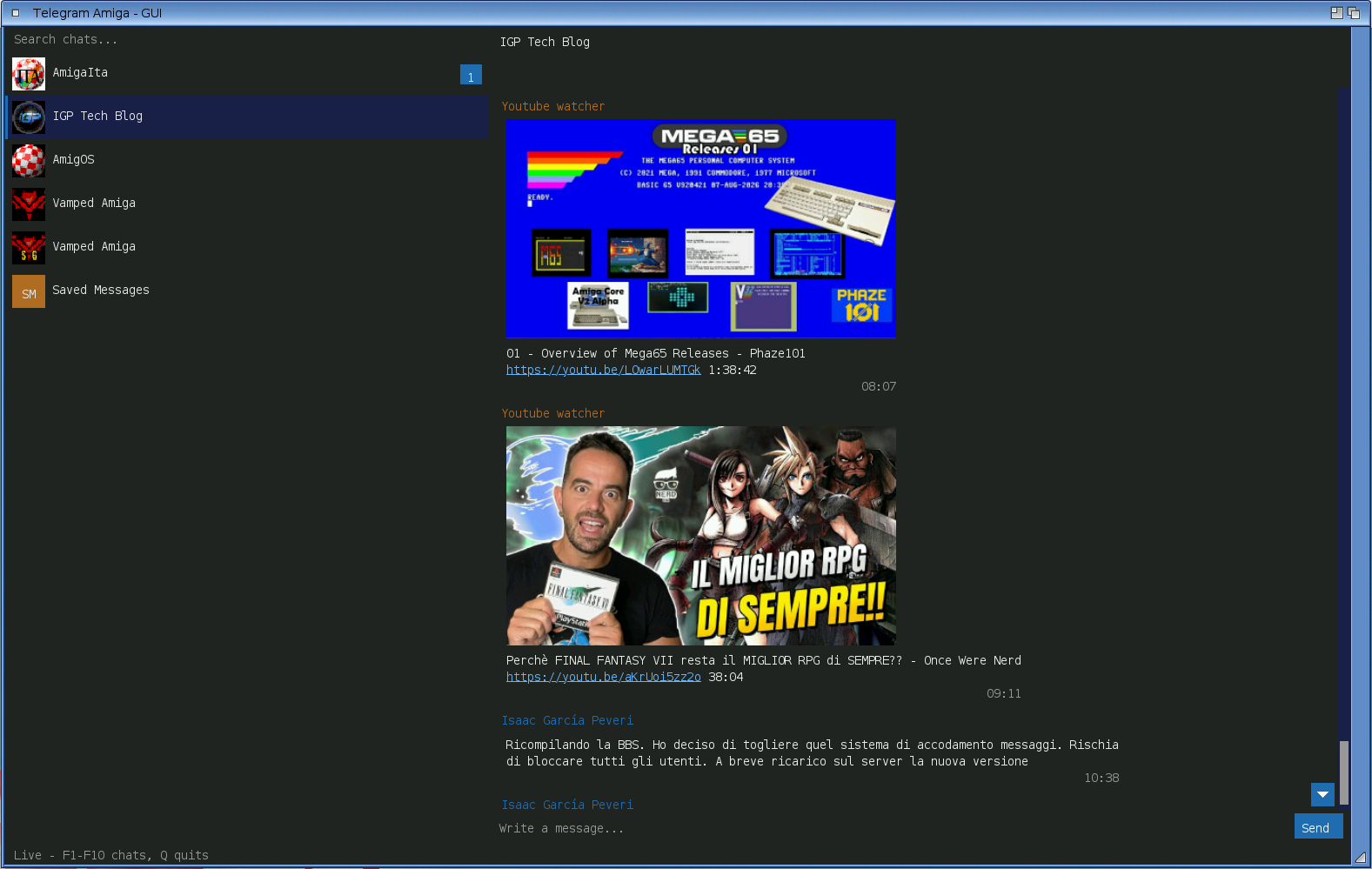
Alpha 0.0.9 is the most demanding release of the project so far. Every photo entering a GUI bubble goes through six stages: stripped thumbnail, bounded fetch, progressive decode in three quality passes, palette dithering, canonical RGB888 cache and redisplay, without blocking the GUI, on CPUs from a 14 MHz 68020 to PowerPC G4 and x86_64, on screens from 16-colour AGA to true-colour RTG.
Telegram’s embedded stripped thumbnail gives an instant blurred preview. Then, during idle cycles, the client downloads a bounded JPEG and decodes it in three quality passes: 1/8, 1/4, final detail. Input, scrolling and resize keep priority. The final result is kept in a versioned canonical RGB888 cache on disk, so reopening a previously viewed chat loads photos from the cache without re-decoding the JPEG.
Decoding no longer uses fixed CPU estimates: each phase measures real execution time, with independent budgets for JPEG decode, cache reads and photo replay. Decoding follows the visible viewport, and the LRU canonical cache at 4/6 slots does not evict active photos. On AmigaOS 3 RTG, RGB888 pixels go directly to the cybergraphics driver; on AGA and non-RTG the pen-grid renderer with ordered dithering remains. MorphOS has moved to the proven pen-grid after the RGB888 path produced grey photos on some drivers.
The fixed-size photo viewer opens by clicking a photo (including the [Photo] label when inline photos are disabled). The S key saves, the context menu offers Save photo as..., and saving asks for confirmation before overwriting. JPEG files can be sent as native photos from the GUI, Workbench drop or the TUI /photo command; above 10 MiB they are sent as documents.
The Telegram menu now has a Settings section with persistent preferences: download drawer, inline photos toggle, Photo dithering (Full, Light, Off) and Photo cache limit (10, 50, 200 MiB or Unlimited). On AmigaOS 3 the first-run inline photos default is chosen from the screen and CPU: disabled without RTG or below a 68040, with automatic hardware upgrade detection.
Message forwarding has finally arrived: to Saved Messages from the context menu, to another chat via Forward to... with a local-search-based destination picker. The TUI provides /forward, /forward <id> and /forwardto. Hidden chats remain in the local cache with a (hidden) marker and return to the sidebar on open.
The TUI now word-wraps on narrow consoles. Temporary logs live in T: and are cleaned up. Shell carries a 1 MiB minimum stack. Photos with captions show both. MorphOS photos are no longer grey. Photo fetch, decode and replay remain suspended during resize. Opt-in live diagnostics identify each stage without logging chat content.
Chapter 10: polishing after photos
Release 0.0.91 does not open another multimedia front; it puts the work enabled by 0.0.9 in order. The new photo-send dialog is shared by the menu, requester and Workbench drop. It shows the file name and size, keeps the draft until upload starts and carries the caption through both the photo path and the document fallback. The TUI uses /photo <path> .
The visible GUI now has a consistent finish: an avatar accompanies the open chat name, consecutive messages from one sender are grouped, and bubbles, badges and the jump-to-newest control use rounded shapes. The caret, reply strip, unread counters and avatar initials now use actual font metrics rather than a guessed baseline.
Under the surface, the client reports a cache entry that disappears instead of retrying forever, gives a plain 68000 a little breathing room during chat-list bootstrap and removes offline self-tests from release packages. CI continues to run them on the host build, while field diagnostics remain in the distributed binaries. This is reasoned optimisation, not cosmetic amputation.
The roadmap is now explicit: 0.0.92 brought link previews, stickers and video frames; 0.0.93 tackles the emoji picker, PNG and the login path; 0.0.94 collects transfer-speed work, MorphOS defects, photo performance under AfA_OS and 2FA on slow 68k hardware. Version 0.1.0 will be a beta with no new features: first comes a quiet cycle, no known freeze, adversarial review and updated texts.
In short
- Telegram Amiga is a C-based MTProto pre-alpha for Amiga-like systems, not just a Bot API experiment.
- The project supports Telegram login, auth-key, 2FA when requested, saved state, dialogs, history, text and photo sending, and an interactive chat mode.
- The work covers AmigaOS 3.x, MorphOS, AmigaOS 4.x, AROS i386 and AROS x86_64.
- The
pufffallback forgzip_packedshows the kind of technical compromise needed to bring MTProto to historical targets. - Alpha 0.0.7 introduced large cancellable transfers, GUI editing, live updates, TUI file/drop support and accented-name search.
- Alpha 0.0.8 makes transfers non-blocking and adds multi-DC, local search, drag-and-drop, a configurable drawer and the AfA_OS workaround.
- Alpha 0.0.9 adds inline photos, viewer, JPEG sending, message forwarding, configurable cache, dithering and hidden chats in the local cache.
- Alpha 0.0.91 refines captioned photo sending, GUI readability, caching, the plain-68000 path and package size.
- Alpha 0.0.92 delivered link previews, stickers and video frames; 0.0.93 adds emoji, PNG and an alternate login route; 0.0.94 collects speed work and open defects, followed by the 0.1.0 beta gate.
- Reactions, full contact management and some Telegram CDN files remain outside the client.
- The GitHub repository and public releases are the starting point for testers and contributors.
Not a single screenshot…?
You are absolutely right — I have just added a screenshot of the latest release GUI running on AmigaOS 4 directly into the article. Thanks for pointing that out!