On this page
Some Galaxy S26 Ultra owners are getting stuck on the setup screen after One UI 9. Instead of the home screen, the phone shows a “webpage is unavailable” error for a Samsung account page. Coverage started on 21 and 22 October 2026, and Samsung has acknowledged the problem on its South Korean community forum.
Related: AndroidLab covered a different One UI 9 problem, battery drain on Galaxy S24 and S25, in our Italian guide One UI 9 consuma più batteria? Cosa controllare. That is a separate issue, not the setup error.
What Samsung has said
According to a Samsung community moderator quoted by Android Police and 9to5Google, the problem follows the One UI 9.0 update and happens when the phone uses an unstable system WebView on certain networks. WebView is the component that displays web pages inside apps and some parts of Android, so the error appears when setup tries to open an account page. The error text also links to a Samsung account policy page at policies.account.samsung.com.
Steps to try, in order
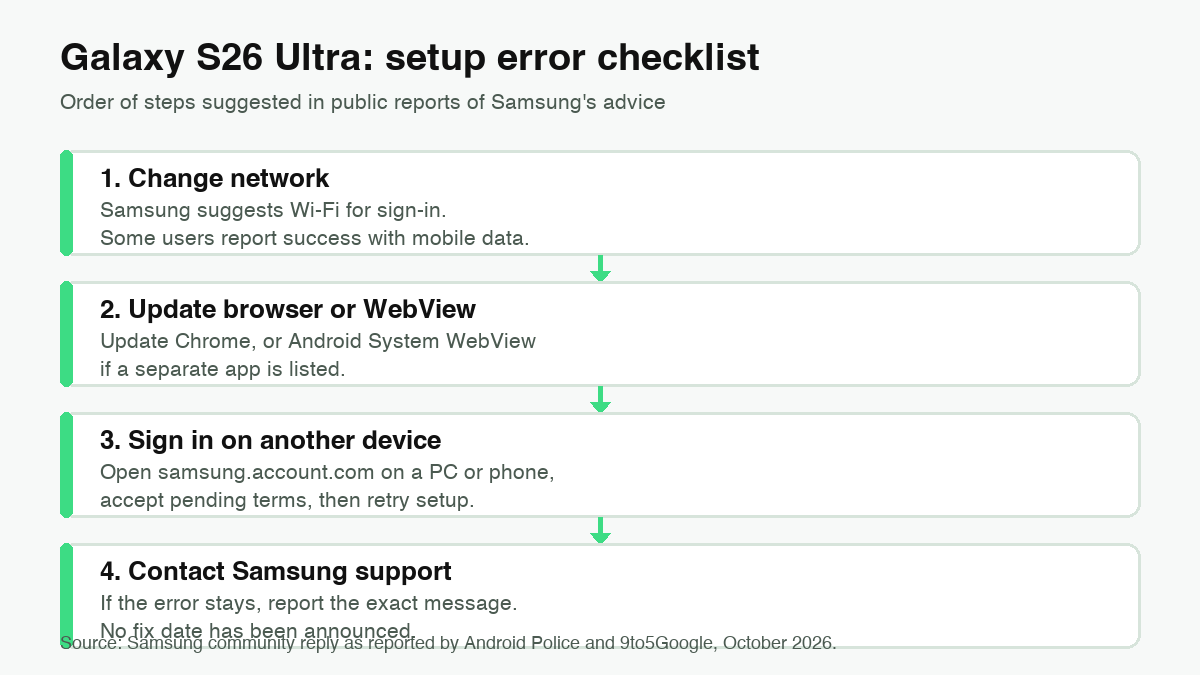
- Change the connection. Samsung recommends Wi-Fi when signing in to the Samsung account. Some users report that the opposite worked for them, moving from Wi-Fi to mobile data, so if one network fails, try the other. Neither option is guaranteed.
- Update the browser or WebView, if you can. Samsung recommends updating the browser, such as Chrome, and Android System WebView. If no separate WebView app is listed, update Chrome and restart setup. If the setup screen does not let you reach the Play Store, skip to the next step.
- Sign in on another device. Open samsung.account.com on a computer or another phone, sign in, and accept any pending terms. Then go back to the S26 Ultra and retry. Android Police reports that Samsung points to the web version of the account site when the sign-in inside the phone fails.
- Contact Samsung support if none of this works. Write down the exact error text and the network you used. Samsung has not announced a fix date, so do not expect a quick patch.
Before a reset, update WebView
If your S26 Ultra works and you are planning a reset or a new setup, do the WebView step first. Google’s System Services release notes list Android System WebView v157 dated 22 October 2026, with “improvements to security and privacy and updates for bug fixes”. The notes do not mention the Samsung setup error, so treat this as good maintenance, not as a confirmed fix. As always, back up your data before any reset.
What is still unknown
The evidence is still thin. Coverage so far centers on the Galaxy S26 Ultra, and How-To Geek notes that the problem appears limited for now. We do not know which networks trigger it, whether other One UI 9 models are affected, or when a permanent fix will arrive. Other One UI 9 complaints, from battery drain to boot problems, are separate reports and should not be mixed with this one.
Our reading
The practical point is simple: this is a setup failure, not a slow update. A phone that cannot get past setup is unusable, which makes the reset decision more important than any tweak. Do not reset a working phone just to test a workaround. If you have to set up a device, use Wi-Fi, update WebView first, and have a second device ready to open samsung.account.com.
In brief
- Reports describe a “webpage is unavailable” error during Galaxy S26 Ultra setup after One UI 9, most often during setup after a reset.
- A Samsung community moderator links it to an unstable system WebView on certain networks.
- Try Wi-Fi first, then mobile data; update Chrome or WebView when you can; sign in to samsung.account.com on another device.
- No permanent fix date has been announced, and reports disagree on which network helps.
Sources
- Android Police, “Samsung confirms fix for nasty One UI 9 bug affecting Galaxy S26 users” (21 October 2026)
- 9to5Google, “Some Galaxy S26 phones are basically paperweights while Samsung fixes a setup bug” (22 October 2026)
- How-To Geek, Galaxy S26 Ultra setup bug (22 October 2026)
- Android Central, “That’s a problem: Galaxy S26 Ultra suffers a horrendous setup bug after One UI 9” (23 October 2026)
- Samsung Community, South Korea forum: user report and moderator reply
- COMPUTER BILD, Galaxy S26 Ultra after factory reset (23 October 2026)
- Google, System Services Release Notes (Android System WebView v157, 22 October 2026)