On this page
Spotify says it may ask some Premium Family members to prove they live with the plan manager by scanning a QR code. Premium Family covers up to six people who live together, including the manager, and the check enforces that rule. Users have started reporting the prompt, and Spotify’s support page describes the process.
How the QR check works
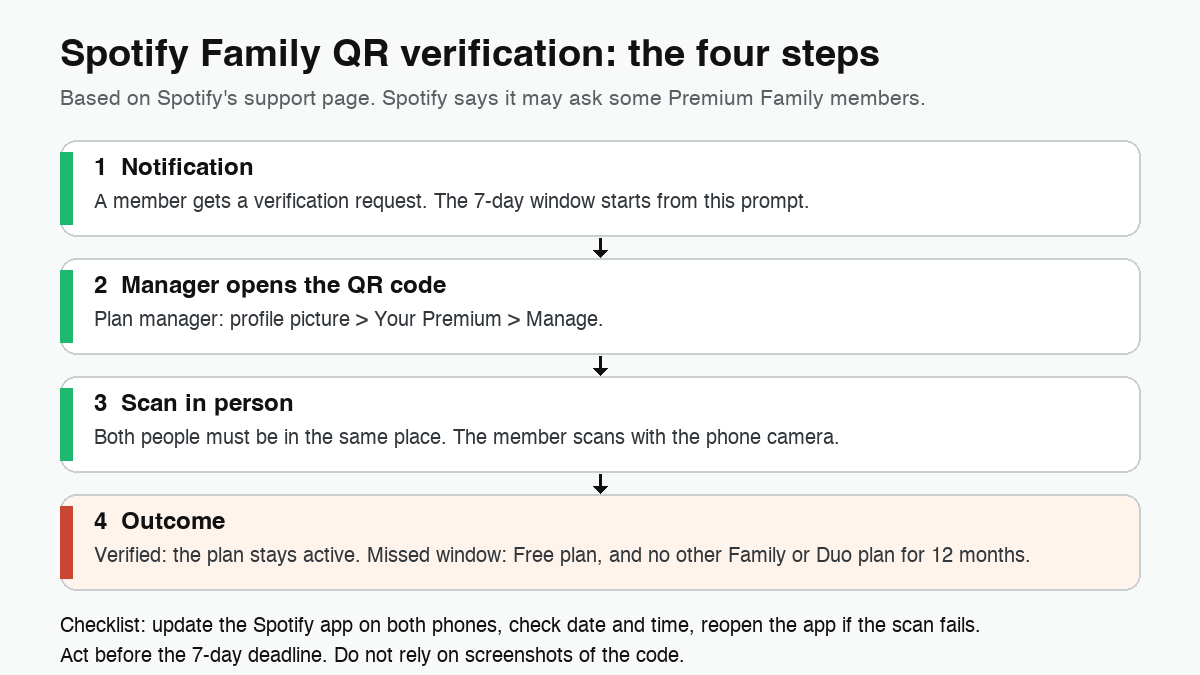
According to Spotify’s support page, the verification happens in the mobile app and needs both people in the same place:
- The plan manager opens Spotify, taps the profile picture, then Your Premium, then Manage. The QR code appears on the manager’s phone.
- The member sees the verification prompt in the app and scans the code with the phone camera.
- Both people must be together for the scan. Spotify says the code changes every few seconds and has to be scanned in person.
The member has 7 days to complete the scan after the notification. That deadline is the part that needs attention, because it decides whether the plan survives.
What changes in practice
For the plan manager, the job is mostly logistics: two phones with the latest Spotify app and a few minutes together. For the member, the risk is calendar-driven. If the scan does not happen in time, the account falls back to Free and the member cannot join another Family or Duo plan for 12 months. An Individual plan is still available, so the loss is not total, but it is avoidable if you act early.
The same support area also covers address verification. Spotify asks members to confirm their full address when they join, when the manager changes address, or when it cannot confirm the address already on file. If that check fails, Spotify emails the member, who has 7 days to re-verify. Spotify says it does not track location and checks the address only for verification.
If the scan fails
Spotify’s troubleshooting list is short. Make sure both phones run the latest version of the app. Check that the date and time are correct on both devices. Close and reopen the app, then try again, scanning the code in person.
Limits to keep in mind
- Spotify says it “may” ask some members, so not every Family plan will see the prompt.
- The support pages we checked do not list markets or dates for this rollout, so do not assume it applies everywhere yet.
- The official route is the in-person scan. Treat any shortcut as a risk to the account rather than a fix.
Official downloads
Spotify is available on Google Play: Spotify: Music and Podcasts on Google Play. Since QR verification is mobile-only, make sure both the manager and the member have the latest version installed.
In short
- Spotify may ask Premium Family members to scan a QR code shown on the manager’s phone.
- Both people must be in the same place, and the member has 7 days to complete the scan.
- Missing the window means losing the family plan and a 12-month block on joining another Family or Duo plan.
- Update the app on both phones, check date and time, and reopen the app if the scan fails.
Related AndroidLab coverage (in Italian): Spotify Managed Accounts on Android.